I've written a few posts about editing post content - and discuss clearing cache after editing, to see updates.
Generally, my posts reference cached posts content. Sometimes, blog owners need to clear cached feed content, in addition to / instead of clearing cached post content.
There is a difference between post content, and newsfeed content - and how both are cached. Newsfeed cache is not as frequent a concern.
When we provide instructions to clear cached blog content, we reference browser cache.
Clear cache - then restart the browser, and check again.
or maybe
Clear cache, cookies, and sessions (yes, all 3) - then restart the browser, and check again.
Posts, updated after published, may create a problem with the posts newsfeed.
In some cases, updated posts may create an "out of sync" condition with the posts newsfeed, as well as the displayed content.
If comparing post content and feed content is important, you need to synchronize the newsfeed with the posts. This will restart the newsfeed - and sync it with the posts.
- Deactivate the blog feeds.
- Publish a post - or delete a recently published post.
- Reactivate the blog feeds.
Activate / Deactivate the blog feeds, using the "Allow Blog Feed" wizard.
The "Allow Blog Feed" wizard, on the dashboard Settings - Other page, in the "Site feed" section, is used to activate and deactivate the newsfeeds.
Look for "Site feed", and "Allow Blog Feed".
"Site feed" is on the Settings - Other dashboard page.
Open the drop down menu, and note the current setting. If you have "Custom" selected, dig deeper.
There are a few selections, in "Allow Blog Feed". For consistent results, note what you have before Step #1 - and re select them after Step #3.
This blog, like many others in Blogger, is "Always Under Construction".
This post, like many earlier ones, was just published. Now, I plan to spend many long hours, reorganising and tweaking the content, phrasing, spelling, syntax - and correcting typos.
If you wish, you can subscribe to any of several posts newsfeeds - and compare the newsfeed content in each, with the displayed posts content. The older any post is, the more changes will be made.
The more revisions I make, the less this post, and the posts feed, will match when compared. Check it, for yourself.
Maybe one day, I will need the feed, in this blog, be accurately updated to compare more closely to the updated posts. Many of my posts double in size, even after post publish edits are "complete".
If you use email, and other feed subscriptions, to read new posts in this blog, you may be missing out on interesting details, added long after posts are published.
Newsfeed content is published once, as each post is published.
Post content may be out of sync with feed content, because post content and feed content is not updated at the same time.
You can update your posts, when you wish. Newsfeed updates are published when the posts are published - and the cached newsfeed is not updated, when you edit a post after it is published.
When you synchronise published posts content with displayed content, you generally clear browser cache. Newsfeed cache is not in the browser - so the latter instructions won't help with newsfeed cache.
That is the basic procedure for syncing the blog content, and feed content. You may have other concerns, though, that might complicate the above procedure.
The procedure is exciting - but painless.
I initially published this post, without any photos - and we see my Reading List, an hour ago.
And my Reading List, after I restarted my blog feed.
It took all of 5 minutes, including making screen prints of my Reading List - before and after, to restart the newsfeeds.
As always, I'll suggest that you Follow this post - and observe the changes. And watch for changes (unlikely) to the newsfeed.
Many #Blogger problems, when being diagnosed, start with advice to clear browser cache (maybe, cache, cookies, and sessions). Not all problems involved the published posts - some involve the posts feed.
You can't clear feed cache, as you can browser cache, because newsfeed content is not cached in the browser. You can, however, force a newsfeed rebuild, by restarting the newsfeed.
People reporting a problem with blog access / performance, in Blogger Help Forum: Get Help with an Issue, will be frequently advised to diagnose their problems using affinity / differential testing.
Some diagnostic advice starts with simple instructions to "clear cache, cookies, and sessions". Some people, alternately, advise "use a different browser" - and test as a reader. These different strategies, seemingly redundant, will frequently lead to different results.
When you test reader access to a blog, some experts will casually advise you to "use a different browser" or "use a second computer".
There are specific reasons why this strategy may or may not be successful, when part of affinity / differential testing. When you test blog access, you're going to see varying reliability - based on a number of browser and reader details.
There are multiple ways to test blog access, of owner vs readers.
Any experienced testing technician knows that the most reliable testing, in affinity / differential analysis, will use identical browsers, on identical and separate computers.
Very few blog owners will have use of a bank of identical computers, for testing. There are alternate possibilities, when identical computers can't be used.
- This browser, in the primary session - after "clear cache, cookies, and sessions".
- This browser, in a secondary session - aka "Incognito" / "Private" browsing.
- A different browser, on the same computer.
- The same branded browser, on a different computer.
- Any browser, on a different computer.
All of these details will be relevant, sometimes - though not always. The differences between "always" and "sometimes" will lead to some testers using incomplete testing techniques - and cause inconsistent results.
This browser, in the primary session - after "clear cache, cookies, and sessions".
The best way to avoid environment based inaccuracy is to re use the environment, sequentially. This approach requires more time - plus development of a testing script, to keep testing procedures consistent.
It is, however, the best way to avoid confusion from inevitable testing variations.
Using the same browser, in the same browser session, one can try using a different identity. This technique starts with the apocryphal instructions to "clear cache, cookies, and sessions".
This browser, in a secondary session - aka "Incognito" / "Private" browsing.
Some browsers support multiple sessions. In Chrome, a secondary session is provided as "Incognito" mode - and in Firefox, a similar (not identical) option is called "Private" browsing. The differences between the "Incognito" and "Private" features are significant - and can cause different testing results.
This blog, displayed in "Incognito" mode.
A different browser, on the same computer.
Each different browser will have differences in the browser itself. Plus, different add-ons and settings, on the different browsers, will produce differing results.
Having both browsers on the same computer will eliminate computer setup differences, present when multiple computers are involved.
The same branded browser, on a different computer.
If the branded browser, on the two computers, is maintained identically, there is a chance for consistent results. Having two different computers involved, however, may offset the consistency gained by using identical browsers.
Any browser, on a different computer.
This is the most inaccurate testing procedure, of the choices listed. Any difference between the browsers, or computers, can lead to inaccuracy.
The differences, in testing, involve multiple details.
- Login identity in use.
- Cookie filters, that block identity.
- Script filters, that block identity access.
- Browser add-ons, that may or may not be present.
- Browser brand and design differences.
Login identity in use.
This is the one difference that you intentionally need, to test the reader experience. In the primary session, you are logged in as the owner. You require at least one secondary session - where you are not logged in as the owner, to test your blog as a reader.
The secondary session is where the need for sequential session reuse - or use of a different browser and / or computer - becomes necessary.
Cookie filters, that block identity.
Many Blogger features - involving both the dashboard, and access to the blog - use cookies to determine identity and permissions. Cookie filters, inappropriately managed, can cause havoc with Blogger. As an example, consider commenting ability, and third party cookies.
Different browsers may have different cookie filter settings. In some cases, identity is not relevant, for testing as a reader.
If you are testing access to a private blog, though, reader identity - which is cookie based - will be essential. A cookie filter involved, with a private blog being tested, will cause problems.
Similarly, testing Google+ comments requires known identity - for both the blog owner and readers. With Google+, identity is essential, to guarantee consistent display of comments.
Script filters, that block identity access.
Many Blogger features - involving both the dashboard, and content in the blog - are JavaScript based. Script filters can cause havoc with Blogger.
Different browsers may have different script filter settings - and different browser brands may have completely different script filters.
Browser add-ons, that may or may not be present.
The Firefox browser does not have native script filters, so many computer owners who use Firefox will add NoScript.
NoScript is a very intense add-on, with a lot of options, and opportunities for confusion. If you were to use Firefox on two different computers, you would need to carefully synchronise NoScript settings on both computers, for reliable testing.
Firefox with NoScript is the best known example - but it's not the only possibility for confusion. Every browser can have script filters, which will make browser to browser testing comparison a challenge.
With Chrome, one can select each individual add-on to be present in the secondary session ("Allow in incognito") - and this will create uncertainty. Some advice to "try using a Chrome incognito window" will be successful, with other advice being useless - and the absence or presence of the necessary add-on will be one of the issues.
AdBlock, optionally included in incognito mode, will produce uncertainty in testing - and is a well known script block.
Browser brand and design differences.
Every different browser produces differences in displayed content. Even a formatting discrepancy can lead to difference in test results.
The end results.
Interpreting test results, based on comparison of different browser displays, will be a challenge for anybody trying to produce reliable conclusions. The most reliable results will come from testing using the same browser session, sequentially. This will start with instructions to "clear cache, cookies, and sessions" - a painful but necessary process.
Many #Blogger problems need to be diagnosed using repetitive testing, and affinity / differential analysis. People who don't understand organised testing will sometimes recommend testing procedures, such as use of different browser sessions - which will produce inconclusive results.
Some blog owners like to validate their Stats displays, using third party visitor logs like StatCounter.
Since Stats displays aggregated page view counts - not individual visitors - a blog owner will find many discrepancies between Stats and StatCounter. One observation might involve Stats indicating periods of no activity, where StatCounter shows an interesting visit.
A visit, registered by StatCounter - but not by Stats - indicates an apparent problem with Stats. Or, so the blog owner might think.
StatCounter displays page views, by counting clicks on the readers computer.
(Note): Please observe that "page views" come from both dynamic pages ("posts") and static pages ("pages") being accessed. When I refer to "page views", don't get confused about dynamic pages ("posts") vs static pages ("pages") - "page views" apply to both.
Stats displays page views, from the Blogger servers. If a page being accessed, by a reader, is already in cache on the readers computer, there will be no access to the Blogger server, and no Stats activity.
This discrepancy can contribute to confusion about visitor count. If two readers, sequentially sharing a public computer, access the same blog page, StatCounter may indicate two visitors.
If the first reader does not cautiously clear the computer before vacating, the second reader will access the page from cache - and will not register Blogger server activity. Stats will show no page views, indicating a second reader.
If a computer is being used with other people waiting for a turn, a reader may not have a chance to clear the computer before giving control to a second reader. The busier the computer, the greater the chance that Stats and StatCounter may show an apparent discrepancy.
There will always be differences between Stats and any other visitor log - just as there will always be differences between any two visitor logs, in general. A discrepancy is not always an inaccuracy.
Everybody who has owned or read a Blogger blog, for more than a week, surely knows about the infamous bX codes - and has probably asked how to fix one.
Some people have fixed one - but immediately, seen another. Others have seen theirs go away, then later discovered that the blog is broken.
Some folks see the errors as major problems, others minor annoyances.it's disheartening to see that the bx error code problems are still existing.
Not everybody realises that the codes are not the problems - they are simply a method to identify the problems. Many Blogger problems cannot be identified easily in language.
Many problems, many "solutions"
There are many known "solutions" for the codes, because there are many different problems, with many different causes. Here, we have 5 examples.- Some codes are caused by an inconsistency in private data. These codes can generally be cleared by "clearing cache, cookies, and sessions".
- Some codes are caused by over enthusiastic template customisation. These codes can be cleared by getting a new template, or restoring the template from backup, for the blogs that are issuing the code.
- Some codes are caused by bogus custom domain addressing, for the blogs that are issuing the code. These codes can be cleared, only, by correcting the DNS addressing, for the blogs that are issuing the code.
- Some codes are caused by trying to use an unsuitable browser. Right now, Blogger does not support Internet Explorer V11 These codes can be cleared only by using a different browser.
- Some codes are caused by dodgy Blogger code. These codes cannot be solved by blog owners or readers. The bX codes, in many cases, are simply from Blogger Engineering adding "break points" into their code, so they can diagnose a known problem.
Above, we see just 5 examples. There is one rule, which you may want to consider, when diagnosing bX codes.There are no rules, in diagnosing bX codes.
That is the plain truth.
History
Before they started issuing bX codes, Blogger would simply issue one universal error, that was incredibly annoying, to everybody seeing it.We apologize for the inconvenience, but we are unable to process your request at this time. Our engineers have been notified of this problem and will work to resolve it.
Replacing that error, with the unique bX codes, was so simple - and elegant. The program, that issues a bX error report, simply takes the address of the failure point in the Blogger code library, where an unacceptable condition has occurred, and hashes the address into a 6 character alphanumeric code. And there is the bX code. Yes, that simple.
Blogger keeps a database listing of bX codes that are currently active, and a running count for each code. When a given code becomes more noticeable than others, an engineer simply uses the 6 character code to locate the failure point in the Blogger code library, and diagnoses the cause of the error. Fixing the code will vary, depending upon the cause of the code.
A hypothetical example
If you add an extra "<div>" tag in your template code, using the Template Editor, it's possible that the Template Editor code may detect it, and specifically advise you.Don't add a "<div>" tag there!
In many cases, through, an extra "<div>" tag won't be noticed until you try to save the changes - or even until a reader views the blog under specific conditions. Either of the latter two cases may result in another bX code.
When you report your bX code in Blogger Help Forum: Get Help with an Issue, if other people have reported that same code, it's possible that we might have a known solution, ready for you.Don't add a "<div>" tag, there!
In many cases, though, you will be advised toRestore the template from backup - or get a new template from the dashbooard Template wizard.
In either case, though, the advice to get a backup or new template is not a solution - it's a workaround. The proper solution is for you to figure out what you did, that was wrong, and correct what you did.
In some cases, if we see enough of the same code, as we do now with the "bX-w7tr63", currently being reported in Blogger Help Forum: Get Help with an Issue - we may advise you.Blogger cannot support you, using Internet Explorer, right now.
Internet Explorer V11 has too many internal changes, for Blogger Engineering to update the Blogger dashboard utilities, and remove all known problems. That may be vaguely similar to the problems where we alternately advise.Restore the template from backup - or get a new template from the dashbooard Template wizard.
In either case, we provide most advice based on feedback from other blog owners.
Reality
Be aware that each bX code may have a different solution. Be wary of advice that simply instructs. Most bX errors are temporary and will usually go away on their own.
You may read [FAQ] What Are The Mysterious bX Codes? and try clearing your cache and cookies.
Some errors may go away, on their own - but most require somebody to take some action. Not all that many are temporary.
Sometimes, when diagnosing a problem which involves cache, you may be advised to "clear cache" - or possibly, "clear cache, cookies, and sessions".
Instructions, to do either, may vary according to the problem being diagnosed. Unfortunately, clearing "cache" or clearing "cache, cookies, and sessions", for problems which involve cache, may not always solve the problem at hand.
If you have a problem when viewing your blog - or if you wish to immediately refresh your personal view of your blog, you might clear "cache". If you have a problem with your Blogger dashboard - maybe when switching between Draft and Production Blogger, on the other hand, you would want to clear "cookies". Whenever you clear cookies, you should clear cache, also - so, if you have a problem when maintaining or publishing your blog, you will be advised to clear "cache, cookies, and sessions".
Not all problems involving "cache" will always be solved by "clearing cache" - or even "clearing cache, cookies, and sessions". Clearing browser cache won't help, if the problem involves- cache outside the browser being used
- cookie or script filtering
Clearing browser cache won't help, if the problem involves cache outside the browser being used. When you clear cache, you are clearing cache in one individual browser.- If you have other browsers, or other computers, you may have to clear cache there, also.
- You cannot control cache, outside your computer.
- You cannot control cache, on your reader's computers.
There is no permanent solution, for upstream cache. But, there may be a diagnostic step, that helps us understand what is going on.
This is the URL of this blog.http://blogging.nitecruzr.net/
If I need to access the main page, without refreshing the browser, or clearing cache, I can retrieve the updated content, on a temporary basis.http://blogging.nitecruzr.net?
A URL containing a "?" is normally used for retrieving a web page, dynamically, with extra settings embedded in the URL.http://blogging.nitecruzr.net?something
A dynamic retrieval is evaluated immediately, using the Blogger server (in this case) - and without any interference from any caches.
Even without a real need to have the URL evaluated by the server, we can still make the URL dynamic, just by adding the "?" at the end. And this bypasses any cache - including cache upstream from the browser.http://blogging.nitecruzr.net?
Just remember - this is a temporary solution.
Clearing cache won't help, if the problem involves cookie or script filtering. If you clear cache when diagnosing a problem with the Blogger dashboard, a problem with commenting, or any other problem which requires logging in to Blogger, you will need to clear cookies and sessions, at the same time. This won't always be successful, even so. If a problem starts from improper filtering of private data, you won't solve anything by clearing private data.
Cookies, needed when viewing a Blogger blog, are vulnerable to "third party" cookie filters.- A preference cookie (aka "cookie") is created under "blogger.com", where an interstitial display runs.
- A session cookie (aka "session") is created under "google.com", where you login.
Both types of cookies are read under "blogspot.com" - or under whatever custom domain, or whatever country code alias, is being used by the blog, as displayed.
Whether a cookie is needed, but non existent - or needed, but can't be read - the result is the same. The reader is unable to continue, and does not get to view the blog, when necessary.
If a problem which appears to be caused by out of date cache is actually caused by a cookie filter, and you clear cache, cookies, and sessions, you won't solve anything. A cookie, wrongly filtered, will continue to be a problem, even with cache cleared.
If a reader is subject to a filter that blocks "third party" cookies, and a preference or session cookie is needed, the reader will be unable to continue. This is a condition that Blogger Engineers cannot program around, because it is part of the security code, in the browser - and helps to protect us from malicious activity, when we surf dodgy websites.
The bottom line is you need to know when to clear cache (and cookies and sessions), in your browser - when you need to clear cache, elsewhere - and when you need to check your cookie and script filters. None of the 3 makes either of the other 2 redundant - advice given in Google - Blogger Help: Fix a Blogger error notwithstanding.
Occasionally, someone may publish a blog as private, invite / accept readers, then later decide that results are not as positive as desired.
It's easy enough to change a blog, from Private to Public. Just go to the Permissions wizard, in the dashboard menu Settings - Basic, and change Blog Readers from "Private" to "Public".
Unfortunately, this may not leave everybody able to access the blog.I made my blog public, last week. Some of my friends are now seeingYour current account does not have access to view this page.
Why is this still an issue?
The blog owner, in this case, is seeing the effect of cache, and authentication.
In many cases, simple instructions to "clear cache, cookies, and sessions" may resolve this problem. This does not always work, however - and the mystery why it does not always work may frustrate us, almost as much as the original symptom.
Sometimes, clearing private data - even though it may be a bit drastic - does nothing to resolve the problem at hand.I just did that - and there's no improvement!
Now, we suspect that there is a cache, outside the browser, that can't be cleared.
There is no permanent solution, for upstream cache. But, there may be a diagnostic step, that helps us understand what is going on.
This is the URL of this blog.http://blogging.nitecruzr.net/
If I need to access the main page, without refreshing the browser, or clearing cache, I can retrieve the updated content, on a temporary basis.http://blogging.nitecruzr.net?
A URL containing a "?" is normally used for retrieving a web page, dynamically, with extra settings embedded in the URL.http://blogging.nitecruzr.net?something
A dynamic retrieval is evaluated immediately, using the Blogger server (in this case) - and without any interference from any caches.
Even without a real need to have the URL evaluated by the server, we can still make the URL dynamic, just by adding the "?" at the end. And this bypasses any cache - including cache upstream from the browser.http://blogging.nitecruzr.net?
Just remember - this is a temporary solution.
If you forget to use the "?" later - and you retrieve the old web page, still in cache, don't be surprised to keep seeingYour current account does not have access to view this page.
Until the cached page expires normally, from the cache that you can't control, that's going to still be a possibility.
>> Top
Most of us, as we surf the Internet, are going to surf some websites, repeatedly.
Everybody has favourite websites. When we surf the same website, over and over, some of what we do and see may not change a lot.
To keep us from wasting our time, and generating unnecessary network traffic, our browsers keep track of the websites that we visit over and over, save records of what we do and copies of what we see, and note what has changed. The website content, stored locally, is known as "private" data.
There are times when we need to clear "private" data. Note the different browsers - and the different menus and selections, provided by each browser.
- If you have a problem when viewing your blog - or if you wish to immediately refresh your personal view of your blog, you should clear "cache".
- If you have a problem maintaining or publishing your blog - maybe when switching between Draft and Production Blogger, you should clear "cookies".
- Whenever you clear cookies, you should clear cache, also - so, if you have a problem when maintaining or publishing your blog, you should clear "cache, cookies, and sessions".
There are other reasons for clearing private data - but there are also reasons for not clearing private data, indiscriminately. It will be worth your time, to understand what and when you should clear - and not clear.
Normally, you would not, routinely, clear private data.
What if you use a publicly shared computer - maybe in a coffee shop or library? Or maybe, you carry your computer to a coffee shop or library? Do you want your private details - such as account names, passwords, even a list of what websites you surf - being available for other patrons of the coffee shop or library, after you leave?
Most of us do not want our private details, visible to any curious fellow patron - or maybe to our family either. But not all data is equally as damaging, if revealed to strangers, or to people who know us.
To help us keep our private lives private - yet not waste time or generate unnecessary network traffic, our browsers offer us the opportunity to save some content, and to delete other content - when we know what options are available to us.
Cache is simply locally stored copies of code and static pages, that you and other people, using the computer, might accumulate. Cache contains no sensitive, personally identifying material - other than (again) possibly identifying what websites you have visited.
If you share a computer with another person, identifying what websites you visited, and what websites the other person visited, will require knowing times each of you used the computer. There are no personal identifiers which indicate which of you visited a given website.
Forms contain online entered data, such as account names. Forms are slightly less sensitive than passwords, since they may contain large volumes of random data. Look at the boxes in the Blogger dashboard - those are all forms. Hidden in the forms, you may find an account name - or an email address. It's like asking how dangerous a needle may be, in a stack of hay.
History is a log, describing what websites, and website pages, that you have visited. History might be important if having people, other than you, know that you visit certain websites; other than the personal embarrassment possibility, history is relatively harmless.
Passwords are the most sensitive bit of data, that you can store on your computer. Someone extracting your passwords, on a per website basis, can use your account in each website, to operate as you. An online password is just as sensitive as the password (aka "PIN") that you might enter at an ATM.
Preference cookies (aka "cookies") are local storage of website relevant details. Preference cookies are miscellaneous settings, used to remember choices which you might make, when viewing a given website, repeatedly. Some browsers identify "preference cookies", and "session cookies", collectively, as just "cookies". Firefox, in various places, identifies "preference cookies" as "cookies", and "session cookies" as "sessions".
Session cookies (aka "sessions") are a cookie, designated by some browsers, as containing login identifiers, and other data relative to one website visit (but let you extend one "visit" to include multiple browser openings and closings). Firefox designates the Blogger login cookie as a session cookie. This is why, when I advise you to clear Blogger dashboard problems, I always specify clear "cache, cookies, and sessions".
In order of sensitivity, I would rank the above elements in a different order.
- Passwords.
- Forms.
- Session cookies.
- Preference cookies.
- History.
- Cache.
Look at cache, to start. Cache is locally stored copies of content, from remote servers. Other than inadvertently revealing our favourite naughty content, there is no danger in cache content being seen to other people. There are three scenarios, when we might want to clear cache.
- To clean up the computer, when it is running slower than normal.
- To provide an up to date copy of a website, immediately.
- When investigating a website login problem, such as a Blogger dashboard problem, which requires clearing cookies.
Cache takes up thousands as much space as cookies, and as passwords.
At the other end of the sensitivity scale, you find Passwords. My personal advice is to not store passwords, period. If you want convenience when accessing a website like Blogger, which offers long term login sessions - when you use a private and safe computer - simply don't log out, from Blogger. If you never clear session cookies, you never have to log out.
If you enjoy the convenience of online banking, on the other hand, you should always log out after an online banking session. If you never store passwords, for online banking, you never have to worry about clearing passwords.
In the middle of the scale, we find Cookies. A cookie is a small, encrypted file, which contains a single setting that lets us visit the same website repeatedly, without having to re enter something.
The Google login cookie (aka "session" cookie) lets us visit Google (and Blogger), and maintain our blogs, without having to login, over and over. This is the infamous "third party" cookie which we need, to use Blogger readily.
Cookies, since some provide login data, are encrypted. Open a cookie file, using a text reader, and see what is there (But do not use "Save" to close the text reader), if you wish to understand.
If you have a problem when viewing your blog - or if you wish to immediately refresh your personal view of your blog, you might clear "cache". If you have a problem with your Blogger dashboard - maybe when switching between Draft and Production Blogger, on the other hand, you would want to clear "cookies". Whenever you clear cookies, you should clear cache, also - so, if you have a problem when maintaining or publishing your blog, you will be advised to clear "cache, cookies, and sessions".
If you have inconsistent private data (cookies don't properly match cache or scripts), you may have to deal with one of the mysterious bX codes. When this happens, then clearing "cache, cookies, and sessions" may be one of the first things to try.
Note that not all problems involving "cache" or "cache, cookies, and sessions" may be solved by "clearing cache" or even "clearing cache, cookies, and sessions". Some problems may require corrected filtering. Also, not all problems, that involve cache, can be necessarily solved by clearing browser cache.
All of these are personal preferences, which I exercise - when using my own personal computer, in the privacy of my home. Other people may be more strict - or some computer owners may never clear anything. When using your computer outside your home - or maybe, when using a public computer - you may wish to be more careful.
My personal advice, for using a public computer, is simple.
- Never, except in an absolute emergency, use a public computer for online banking.
- Whenever finishing a session on a public computer, always clear all private data, and restart the computer.
Some short term use public computers, such as stand up terminals in libraries and shopping centres, are specially designed to reload the entire system configuration, and operating system, and wipe all "private" data, after each individual person has used the computer. If you must use a public computer, those would be the safest ones to use.
Similarly, if you carry your own computer outside your home, you may be concerned with other people seeing what's on your computer, intercepting your network activities (if you use a public network), and / or stealing the computer. Depending upon which possibility concerns you, you might take any or all precautions, before carrying the computer out the door.
- Clear passwords (if you store passwords, locally).
- Clear history and cache (if you fear people browsing your computer).
- Clear all private data (if you fear theft).
Who knows what embarrassment (financial, and personal) you might save yourself, by thinking ahead?
One of the more intriguing subjects of confusion, about feed gadgets, involves gadgets with more feeds in the list then they are set to display.
Occasionally, in Blogger Help Forum: Something Is Broken, we see the petulant queryWhy does my blog disappear from (feed gadgets on) other peoples blogs?
This confusion starts with the question of how often and when we update our blogs, as opposed to how often and when the other blog owners update their blogs. It continues with the little known effect of the difference between how many feeds are in the gadget list, as opposed to how many feeds the gadget is set to display.
A gadget which has 10 feeds in the list, but is set to display only 5 feeds, will display the 5 most recently updated feeds.
A feed gadget will display only the count of feeds that it is set for.
The other 5 feeds will not display - and since the display order will vary according to date last updated, so will the set of feeds displayed. As different feeds are updated irregularly, they become the 5 feeds displayed. The other 5 feeds, updated less recently, will seem to disappear from the display.
This blog has a BlogList with 6 entries (currently) - but set to display the 5 most recently updated feeds. There will always be 1 feed which does not display - and the missing 1 feed, at any time, will be the least recently updated.
Look in the sidebar, for the gadget labeled "THE REAL BLOGGER STATUS - POSTS". Below that gadget, you'll find an unlabeled feed gadget, displaying feeds from 6 different blogs.
What displays, over time, will vary - depending upon recent updates.
If you watch this blog over a period of days or weeks, you'll see 5 feeds display, in an occasionally changing sequence. That sequence, seemingly random, will reflect the 5 feeds most recently updated - and the 6th feed will seem to disappear.
If you are an owner of one of the blogs which are featured, in that feed gadget, you may be occasionally asking yourself
Why does my blog seem to disappear from The REAL Blogger Status, from time to time?
The disappearance will not involve your imagination - just how often you update your blog, compared to how often the other blog owners update theirs.
You can look at the gadgets on your blog - and see the effect on your blog.
Look at the various BlogList and Feed gadgets, on your blog. Do any of your gadgets have a list that's longer than the display number? It's perfectly valid to do this - but if you are doing this, consider that somebody who publishes one of the blogs, that you've featured in your gadget, is occasionally asking himself
Why does my blog disappear from (your) blog?
Occasionally, in Blogger Help Forum: How Do I?, we see a plaintive queryHow do I remove my blog from using Draft Blogger?
Some blog owners use Draft Blogger because of a specific problem - then discover later, that use of Draft Blogger, in general, is not a good idea.
Generally, one simply logs out of Blogger, then logs into Blogger using the normal Blogger login.
Simply logging out, from Draft Blogger, won't always fix the problem.
Sometimes, though, simply logging out of Draft Blogger won't return the browser to normal.
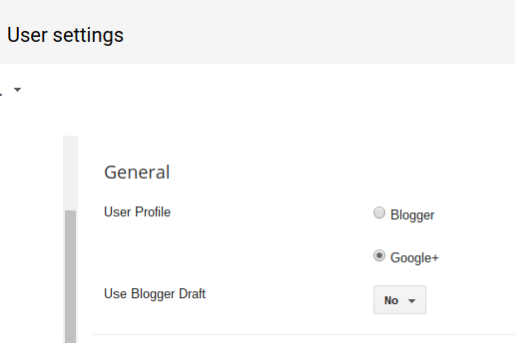
In the latter case, one must first clear the Draft Blogger setting, using the "User settings" dashboard page - where we see the key settingUse Blogger Draft
Change that option to "No" - then clear cache, cookies, and sessions, and restart the browser, to remove all residual components of Draft Blogger.
Use the Settings - "User settings" dashboard page.
Use the Blogger "User settings" dashboard page.
Change "Use Blogger Draft" to "No".
Then, hit "Save settings".
Finally, login to Blogger, properly.
Finally, log into Blogger, using a normal Blogger login. Avoid any bookmarks, favorites, or other saved access URLs. And, be sure to login properly.
Occasionally, a bewildered blog owner will write into Blogger Help Forum: How Do I?, and askHow do I completely remove a post? I deleted a post - but my readers still could read it, in Google Reader!
Some owners are not clear about the nature of post deletion, and the blog feed.
One of the solutions for recovering a deleted post is to retrieve it from Google Reader. Even if you have not subscribed to the blog feed, you can, at any time, subscribe, and retrieve the text content of any previously published post. This solution works because once published, a post will remain in the blog feed for eternity.
Until the post is published, it's in Draft status. As soon as the post is published, the published copy goes into the blog feed. If you immediately revert the post to draft status, the post disappears from the blog main page (subject to clearing browser cache) - but once published, the post remains cached in the feed.
As long as the blog exists, and the blog feed exists (the blog remains public, and the feed is enabled), all previously published posts will remain cached in the blog feed. It may be possible to reset the blog feed - though both of these solutions should be examined carefully - for how your existing readers might be affected.Depending upon local caches of feed content, the blog feed may, or may not, be reset for everybody, with either procedure.
This is both good, and bad - but it is simply something that you can't change, easily.
>> Top
Every week, we see the naive queryHow do I prevent my pictures from being copied?
and this, I regret to say, is a magic trick that has yet to be perfected. Others askWhy does Google let people publish blogs with pictures stolen from other blogs?
and here, we have to note that Google has no interest in controlling blog content, beyond the limits of their own TOS regulations.
Each of us is responsible for ensuring that our content - that we own - remains ours.
Google doesn't do this for us. They aren't legally, morally, or socially responsible for controlling duplication of blog / website content, until the owner of any blog or website reports a problem. And even when a problem is reported, they have to consider both sides of the story.
Protecting our blog content is our responsibility.
Some well meaning helpers will tell you of free software that blocks context menu (right mouse click) "Save Image As". That software is written as JavaScript. Many folks, like me, explicitly block JavaScript from "BlogSpot.com" and other untrusted domains, using Firefox and NoScript, for personal security. Blocking scripts from untrusted domains is a normal component in layered security, on our computers.
Besides the fact that you can't effectively block the context menu "Save Image As" command, you can't control what's stored on my computer.
If your blog is viewed on my computer, it's my content.
I've written about cache, here and there. Cache is a basic feature in Internet design. It lets us view the same web site (blog) repeatedly, without requiring that the same content be downloaded from the server repeatedly. If you're viewing this article using your browser, it's cached in your browser.
If your computer is on a large network, it's possible that your computer connects to the Internet through a caching proxy server. If your ISP offers enhanced bandwidth, it's possible that they cache content too.
If I added a picture to this article, it would be cached, along with the text that you are reading. The right software can search and retrieve any cached content, from any cache. Anybody who needs to "steal" your pictures just needs the right software, and he can steal them right out of cache.
Anybody can make a screen print.
Besides blocking the "Save Image As" wizard, and from prohibiting caching, you'll face a third challenge. What's on my screen can be copied. Screen printing is very popular software. Print the screen, crop everything but the picture of interest, and there it is. Save it, and you have it. Display the picture full size, print that, and you have the full size copy.
How about watermarking the pictures? Put the URL of the web site in the corner. You can do this using IrfanView, PhotoShop, and a few more image processing programs. But watermarks are just bits. What you can take out, I can put back, with more software. And watermarks make the pictures ugly. They are as bad as the broadcast TV commercials at the bottom of the screen.
You can copyright your pictures - but can you enforce the copyright?
Finally, you are entitled to copyright your content. There are some free copyright "protection" services too. Register your content, and it's protected. But no, the Internet reaches all over the world.
Can you afford the lawyers, that will practice in every nation worldwide, and enforce your copyright? If your content / pictures are being pirated on a Blogger / Google hosted web site, you may be able to get action from a DMCA Complaint - but note the warnings, carefully.
Face it - once you publish a picture in your blog, it too is like a dandelion. It's out of your control.
Sorry. Magic only goes so far.
One of my most intriguing subjects (to me, anyway) examines the differences between the "root" alias of a BlogSpot blog, and the "www" alias (ie, "bloggerstatusforreal.blogspot.com" and "www.bloggerstatusforreal.blogspot.com").
The fact that they are separately stored in browser cache will cause mysterious results, when the blog is viewed alternately using the two different aliases.
This is not a terrible problem for your readers, when they simply read the blog. It can cause problems with the search engines, though, as they index your blog based upon inlinks from your readers.
When you publicise your BlogSpot blog, you are hopefully careful to use only one of the aliases, consistently.
If this blog was published only to "bloggerstatusforreal.blogspot.com", that is the URL that I would use. But there are reasons why Blogger provides us with the use of the "www" alias too, and that has very likely spawned a community of bloggers who refer to their blogs using the "www" alias.
If your blog is inlinked by a blogger of the latter community, I will bet that some of them are similarly inlinking to the "www" alias on your blog. So now, you are going to have some readers inlinking to the "root" of your blog, and others inlinking to the "www" alias.
What do the search engines do? They index based upon the inlinks, then they see duplicated content between the two diferent addresses, and they levy the infamous "duplicated content" penalty. Worse yet - because of the asynchronous cache issue, they're going to also index different content occasionally.
Google has provided us with a solution to this "split personality" problem. If you setup Google Webmaster Tools for your blog, click on the "gear" icon, and select "Site Settings". For "Preferred domain", you'll have the choice to have your blog indexed consistently, as either the "root" or the "www" alias.If you specify your preferred domain as http://www.example.com and we find a link to your site that is formatted as http://example.com, we'll treat that link as if it was http://www.example.com.
You should note that, if you're using a custom domain published blog, as in "www.example.com", this option is more likely to work if you setup the domain DNS properly.
A very simple setting, easy to make, and with apparently magical results. No more schizophrenic indexing. Simple, no?
>> Top
We've known for a while that private blogs have limitations, such as latency.
If you originally publish your blog as public, and later make it private, cached copies of the blog will be all over the Internet, for anybody to read, after it's supposedly private. This week, we see another, possibly more serious limitation.Why was my coworker able to read my very private, personal, password protected blog yesterday? I had it set to "Blog Author Only" and yet she found it and was able to read the whole thing.
It has never, ever been public. I started it last September and set the permissions to "blog author only" at the start for all posts. I have never invited anyone else to read it...and have never, ever logged into it at work.
The private blog interstitial may not be loaded, for any would be reader, for several reasons.
The private blog interstitial won't be loaded, before every access to the blog.
People with blog content cached locally - either on their computer, or their network - won't always requires Blogger server access, when a blog page is displayed. Some visitor logs will detect blog access, even when cached content is retrieved - and even when the private blog interstitial is not involved.
Some readers may inadvertently provide access to other network users.
Occasionally, while using slow Internet access, I might load a private blog.
As the blog loads, the browser identifies the various components of the blog, such as various pictures loading, in the browser status area. An odd interstitial notice might be seen.
This blog is open to invited readers only
It doesn't look like you have been invited to read this blog. If you think this is a mistake, you might want to contact the blog author and request an invitation.
This might come up well after the blog main page contents have loaded.
If you are surfing from a network which uses a caching proxy server, it's possible that one person who has permission could properly load the blog in their browser. With the blog having been loaded once, the proxy server may not load the interstitial page again. Anyone else on the network could later view the blog without the interstitial page - even if they do not, supposedly, have permission to do so.
If your Blogger profile is part of your public blogs, or people link to your profile while surfing profiles, and your private blog is listed as one of your blogs, someone may click on the link, and may get a view of the blog.
Invited readers may intentionally share their recently received invitations.
A second problem comes when you invite people as members of your blog. The invitation goes to specific people, who are free to forward the invitation to their other email accounts, and even to the email addresses of their friends. You may invite one person, and you may see a dozen persons later reading the blog. This may even account for a known discrepancy with the 100 member limit.
These security deficiencies are not ones that you can control. You have no way of denying anybody access to your profile, if it's published publicly. Nor can you stop people who you invite to your blog, from forwarding the invitation to their friends.
If you want to keep your blog private, it would be a good idea to at least remove it from the list of your blogs, in your profile.
Private blogs are not immune to referer spam.
Some entries in some visitor logs might make us think that unauthorised people are reading a private blog. Referer spam is not blocked by the private blog interstitial - since referer spam does not involve actual blog access.
As previously stated, visitor logs are not 100% accurate.
These various issues contribute more reasons why no visitor meter will ever be 100% accurate.
I'm a desktop / network support technician, and I enjoy troubleshooting problems with other peoples computers. I prefer that my own computers remain trouble free (of course, that won't always be the case). I can apply my skills in desktop / network troubleshooting to the tasks involved in troubleshooting problems with Blogger, and Blogger blogs.
So, consider this. Blogspot / Blogger hosts millions of blogs, and has many more millions of worldwide customers reading those blogs. You send in a complaint to Blogger Support, about your blog, or your connection to Blogger / BlogSpot, and your complaint goes into a long queue. And if it's just YOUR problem with YOUR blog, or YOUR connection, that's where it will likely stay. Problems affecting multiple blogs, and problems affecting multiple Bloggers, or customers, will always get higher priority. That's common sense.
So, if YOU notice a problem with YOUR blog, or with YOUR connection, it's up to YOU to do some initial troubleshooting. Now, as a desktop support technician, I preach diagnostic procedure. Constantly.
Note: This article is a Blogger specific adaptation of Solving Network Problems - A Tutorial.
Here's where multiple observations is essential. If you see a problem with your blog, do any of your friends see the same problem? Do you see the same problem with your friends blogs?
You also have to understand the concept of cache, which partially explains why not everybody sees a problem with your blog at the same time.
Now the customer, and server, population for Blogger is immense. Blogspot uses thousands of servers to host the millions of blogs that they have. So the fact that your friends may or may not see the same problem on your blog, or you may or may not see the same problem on your friends blogs, is not in itself definitive of a worldwide Blogspot problem. But it can help us develop a procedure for diagnosing your problem.
There are several major items involved in any problem.
- The content (the text that you typed into your post, or the template) for your blog might have (gasp) coding errors. This will affect everybody who views your blog, until you fix your mistakes. And, if you haven't done this yet, backup your blog. NOW.
- The database where your blog is stored might be corrupt. This problem may affect other blogs, and other Bloggers. It will affect other folks viewing your blog, if they don't have a good copy already cached on their computer. If your problem is not part of a major outage, republishing your blog, which takes the source text (item #1) and rebuilds the blog into a web page, may resolve this.
- The server which serves Blogspot content to you may be having problems. This will affect your ability to view multiple blogs. Other Bloggers using this same server will have the same problems. With 4500+ servers, it's possible (but not likely) that you may know somebody else sharing your server. If your problem is not part of a major outage, clearing cookies and changing your server may resolve this.
- Your computer, or your network, may have problems, or some characteristic of your ISPs service may cause a problem with a Blogger server. I work with these sort of problems, and know how tricky they are to diagnose. This will affect you only, or others in your area too. It may, or may not, affect your access to multiple blogs.
- The cache of your blog, and other blogs, on YOUR computer, may contain bad content from any previous existence of any problems. This should only affect your computer, though any other computer may have similar problems.
- If both you and your friends see a problem with your blog, there's a good chance that any fixes that affect only you won't have too much effect. Here you need to concentrate on items #1 - #3, from the above list.
- On the other hand, if you have multiple friends viewing your blog (and here is one example why having friends is a good thing), and nobody but you sees any problems, items #4 and #5 are more likely suspects.
- If some friends see problems, and others don't, it's still more likely that the problems involve items #1 - #3.
- If you see problems with your friends blogs, and your friends see those same problems, it's likely an outage at Blogspot. Maybe Blogger Status will acknowledge the outage. Don't hold your breath, but look there anyway. File a Blogger Contact Report, but again, don't hold your breath.
OK, let's translate the above sermon above into a usable procedure.
- Check Blogger Status. Check Real Blogger Status (here). It's possible that the problem has been noted already. Check the online Blogger databases - Blogger Help, Blogger Known Issues, and Blogger Status. Check the online forums - Google Blogger Help, and Blogger Forum.
- Check Recently Updated Blogs, which lists all blogs updated in the immediately previous 10 minutes. The number of updates enumerated there may confirm or deny any suspicion of a widespread publishing problem. If any doubt, check in another 15 - 20 minutes (open another window), and compare the 2 lists.
- Note that both Blogger Status and Real Blogger Status provide Atom and / or RSS feeds. If you use Syndication / Atom, you may find this convenient. Or, you can Follow this, and other, blogs, for a more convenient subscription.
- Are you, and your friends, having problems viewing your blog, and other blogs? If the problems are just yours, or if they involve multiple blogs, pray, then troubleshoot the cache. If you see an improvement, clear cache and cookies on your computer. If this helps you, let your friends know, and have them do the same (if they are affected).
- If your friends see the same problems with your blog that you see, chances are that the previous step won't fix things by itself. Did you just post something, immediately before the problem was noted? Go back and verify what you just changed. Correct the problem, if necessary, and republish. If you get an error from publishing, proceed to the last step.
- Did you make a change in the blog content, from executing the previous step? If so, clear your cache.
- If you have executed all above steps, and you or your friends still see problems, then it's time to seek collaborative analysis.
- Try to file a report with Blogger Support, observing their current (and dynamic) problem resolution policies. Wait for the botmail.
- Reply to the botmail, objectively pointing out that none of the suggested references - none of the online Blogger databases, or the online forums, offer any help.
- File a description of the problem, what you've done to date, and the botmail problem number (if any provided), at Blogger Forum and at Google Blogger Help.
- Look in the forums for others with your problem, or for any helpful suggestions. Let others know that you are having this problem. Note any correspondence with Blogger Support, and note your problem number. Provide useful diagnostic information about you, your computer, and your Internet service. Links between your thread in one forum, and any others, are not a bad idea either.
- Check back in Blogger Forum and at Google Blogger Help, for comments to your posts, regularly. Be prepared to answer questions. Crosspost updates to the other forum.
- If any of the above steps help you diagnose or resolve the problem,
- Say a prayer of thanks to the deity of your faith.
- Backup your blog. Having a local mirror of your blog can be very useful.
- Sign my GuestBook, or alternately, leave me a comment. Knowing that this blog is of use, or not, motivates ongoing additions and improvements.
- Post back in the above mentioned forums, and close any open threads. Become part of The Solution.
If you're having a problem, don't just drop it on Blogger Support. Involve Blogger Forum and Google Blogger Help, too. Update all 3 groups, regularly, when suggestions are made by any others. Be patient and persistent.
>> Top
Frequently, when Blogger makes a change to their databases (and possibly to your blog), the change will require changes to the code that gets run from your computer (or your readers computers).
Some of the code run from your computer is in the cache on your computer (and likewise on your readers computers). And remember that the content of the cookies on your computer may affect how the code is used.
If a change that Blogger makes includes both a change to the Blogger database, and to the Blogger code run from your computer, the code cached on your computer will be out of date, and may cause problems.
Maybe the Blogger code on your computer (cached yesterday) is processing your Blogger blog, which includes a new option (added today). The code sees the new option, and not knowing what else to do, ends its progress with a bX- code. That's your computer (running the Blogger code) saying
Hey! What should I do now?
So when you have a problem, like maybe seeing a new bX- code, and Blogger has just made a database change, sometimes they will suggest that you clear both cache and cookies, and restart the browser. That's not Blogger making you jump through hoops, that's them asking you to help them to help you. And there's no "secret key sequence" that let's you "bypass the error code screen", as some trolls try to tell you.