Showing posts with label Login. Show all posts

Sunday, June 12, 2016

Dynamic Templates And The Navbar

If your blog is published to a dynamic template, neither you or your readers will have a navbar, when your blog is being viewed.

The navbar, found on blogs which use a non dynamic template - when selected by the blog owner - has a number of reader friendly icons and links.

Dynamic templates have a "menu bar" 1/5 of the way down the page - which provides a combination of the Pages gadget, and limited navbar functions. At the far right end of the menu bar, you'll see 2 tiny icons - when you are properly logged in as the blog owner.
  • New post, the "pencil" icon.
  • Home, the "home" icon.

Blog administrators have limited navbar functions, on a blog that's published using a dynamic template.

Blog administrators have limited dashboard access using menu bar icons.

The menu bar, just below the dynamic template title section, has the "New post" and "Home" links.


There's the menu bar, just below the Title / Description.


At the far end of the menu bar, the "pencil" and "home" icons.


You'll see the "pencil" and "home" icons - when you are logged in to Blogger, as the blog owner.

Blog readers have no navbar icons, in the dynamic template menu bar.


If you're not logged in to Blogger, you get no menu bar dashboard access.


If you never logged in to Blogger, or if you have a problem with a filter blocking access to the login cookie, you won't have any dashboard access.

If you can't access the dashboard using icons, you'll be able to login - just use a bookmarked link.

https://www.blogger.com/home

If you have a cookie filter problem, you may have to login again, to access the dashboard for your dynamic template blog.

A #Blogger blog that uses a dynamic template won't have a navbar, with easy access to the dashboard, and a convenient login / logout link. Dynamic templates provide a menu bar, which is a combination of a miniature Pages gadget and navbar.
target="_blank"

Sunday, December 28, 2014

GeoLocation, And Our Use Of Blogger

Recently, we've seen signs of confusion, from people who have problems with their Internet service, which shows them moving around their geographic region.
I logged in to Blogger, with no problem, yesterday. Today, after logging in successfully, I am asked for more details, to prove my identity!!
This blog owner has a problem with location based security.

Not all Blogger blog owners or readers understand that Country Code Alias Redirection, and the ability to access one's Blogger / Google account (and prevent others from accessing it), both depend upon the ability to determine the geographical location of each blog reader.

Various Google features, like Country Code Alias Redirection, and Google login, use geolocation, to identify the location of each reader.

For people using the Internet, Geolocation uses the Internet connection, to determine physical location. Unfortunately, for many blog owners, the Internet Service Provider, the Internet connection, and the Internet customer (or Blogger blog reader) may each be in a different location.

My own location - even when I am at home - may, at times, appear to move in a 30 mile radius. My ISP routes my connection through any of half a dozen different connection points, in my region, depending upon current network activity.

Some smaller ISPs, located near a country border, may actually get service through a larger ISP in another country. Customers of the smaller ISP may appear, through geolocation, to reside in the other country.

This can be an unfortunate problem, with country code alias redirection, with language detection, with login authentication, and / or the Location option in Post Editor.

People located in one country, reading an unfamiliar language, or seeing their latest post show up in the wrong province / state - or even country - may not appreciate the confusion which is caused. And people who login, and appear to move from city to city in the region, grow tired of having to prove their identity - after successfully entering account name and password.

Thanks to domain based filtering, this may become a security issue for some blog owners, near country borders, who may not be able to maintain / publish their blogs.

Unfortunately, geolocation, using the Internet Address (aka "IP" address), will never return consistent and precise results. Any location based processes will always provide fuzzy results, thanks to Internet services which load balance their network connections.

Friday, December 26, 2014

If You Travel, Be Prepared To Prove Identity

We're seeing reports from people who claim to be traveling, and who can't login and access their blogs.

Google appears to now authenticate us using current location, as well as account name / password. We see occasional reports, in Blogger Help Forum: Get Help with an Issue, about new security procedures.
I am traveling, and I need to access my Blogger account from another country. I know my account name and password - and I logged in successfully. But after logging in, I am still being asked to prove my identity!!
This blog owner is finding a problem, with Google taking extra measures to protect our accounts and blogs.

Google is trying to protect us, from people who access the Internet from different countries - and who try to access our Google accounts, and steal control of our blogs.

Somebody in a foreign land, accessing your account, may not be you.

If you normally access the Internet from your home, and you travel to another location and try to login to Blogger / Google, you may be asked for additional details, to prove that you are the legal owner of your Blogger account. You may feel like you are being treated discourteously, when this happens.

In reality, Blogger is simply trying to keep your blogs under your control, by preventing people other than you from stealing your Blogger account, blogs, and email account - and possibly, your friends Blogger account, blogs, and email account.

When you travel, you spend time preparing for the trip.

When you prepare to travel to a distant country, you are responsible for getting your travel documents (passport), permissions (visas), maybe make health preparation (update immunisations, get extra medications) - and learn a minimum amount of the local language, before you go.

Maybe you should also spend some time getting your Blogger / Google account in order (update any backup details, such as backup email address and phone number). Even, plan an account recovery, from time to time.

This is an excellent time to try 2-Step Verification.

You might even consider setting up Google 2-Step Verification - and generating a set of one time backup authentication codes.

If you don't prepare your account for travel, you may have to wait until you get home, to post to your blog. You may even be asked for proof of identity, when you get home, too.

Wednesday, December 24, 2014

Your Reading List Is Unique To You

One question, that I have never seen specifically asked, is about our following, reading lists, and blog subscriptions in general.
Why do I have to login to Blogger, to maintain my Reading List?
The blog follower / owner has asked a question that is involved in various problems, in Blogger Help Forum: Get Help with an Issue - but with this question so easily overlooked.

The Blogger dashboard Reading List, which so many use transparently, is unique to each of us.

Similar to the confusion about the email address, mysteriously displayed on our Blogger dashboard, is the unstated detail that each of us has our own personal set of followed blogs - and consequently, our own Reading List.

If you want to maintain the (Blogger Following / Google Friend Connect) Followers community, on your blog, you are forced to do this, as part of the Followers GUI. When you are able to access the Reading List "gear" icon, and "Manage Blogs I'm Following", you have already logged in - possibly, without realising.

Sometimes, blog owners have learned of various dashboard shortcuts - and use them transparently. All blog dashboard access requires a login - to simply prove, to Blogger, that you are the owner of the blog in question.

Most blog owners understand, instinctively, that they must login to access each blog dashboard. Not everybody realises, however, that they have their individual Reading List - also accessed by their own login, on the dashboard "home" page.

Along with having your own Reading List, you have your own reading list maintenance wizard (aka "Manage Blogs I'm Following" - or possibly the Google Friend Connect equivalent, for Blogger accounts that use Google+ profiles). To access your own wizard, you must identify yourself, by logging in to Blogger.

Failure to use the right Blogger account, or using a computer that prevents proper identification, leads to an empty Reading List - or to a list with just one entry. This is one reason for some people claiming that the Reading List is unreliable.

Tuesday, November 18, 2014

Comments, Owner Choices, And Reader Choices

Much of what we do in life - and what we do when using Blogger - is based upon, and limited by, choice.

Some choices we get to make, for ourselves. Other choices are made for us, by people who make their own choices.

Some blog owners do not want their readers to have to login to Blogger, to comment on their blogs. Other blog owners do not want their readers to have to solve a CAPTCHA, to comment on their blogs.

A few blog owners do not want their readers to have to do either.
It seems anyone who wishes to leave a comment, will have to do some form of login, either via Google or a CAPTCHA, to do so! Is there a reason for this, would it not be easier, for anyone to just leave a comment?
And the answer here is simple.
It would be easier, if neither were required.
But reality - involving activity by spammers, and activity to counter spammers - leaves some of us with less choices.

Long ago, Blogger allowed anonymous comments, without a CAPTCHA to solve. Spammers benefited from that possibility.

Later, Blogger added the ezCAPTCHA, to be required at the owners decision. Some owners chose to not select the CAPTCHA, because their readers were inconvenienced. Spammers continued to benefit from blogs which allowed anonymous comments, and no CAPTCHA.

Recently, Blogger added the non optional reCAPTCHA. This requires anybody not logged in to have the choice - login, or solve a CAPTCHA.

Unfortunately, the latter change made the third party cookie filter issue more critical. People who are already logged in, but are subject to third party cookie filtering, have to login, or solve a CAPTCHA. This requirement may vary, according to the variant of the commenting form, used by the blog.

Now, a blog owner has 4 choices, to control anonymous comments.
  1. Don't allow anonymous comments, and don't require a CAPTCHA. People who are not logged in will have to login, to comment.
  2. Don't allow anonymous comments, but require a CAPTCHA. People who have not logged in will have to login, and solve a CAPTCHA.
  3. Allow anonymous comments, and don't require a CAPTCHA. People who have not logged in will have to either login, or solve a CAPTCHA.
  4. Allow anonymous comments, and require a CAPTCHA. People who are not logged in will have to solve a CAPTCHA.

Some people will have to either login, or solve a CAPTCHA, to comment. Depending upon what choices are made by the blog owner, the readers may have any 2 of 3 choices.
  1. Solve a non owner optional reCAPTCHA.
  2. Solve an owner optional ezCAPTCHA.
  3. Login.
You'll like the ezCAPTCHA a lot more than the reCAPTCHA.

People who are logged in to Blogger / Google, and are not subject to third party cookie filters, may not see a CAPTCHA - and will not have to login to comment. People who are logged in, but are subject to third party cookie filters, will have to either login, or solve a CAPTCHA.

Owners of blogs which attract readers, who choose to maintain their cookie filters, will benefit more from the new CAPTCHA, than owners of blogs which attract readers who do not choose - or do not care - to maintain their cookie filters.

To make the choices easier to understand, Blogger would have to make "Require CAPTCHA" a binary option, for at least 3 comment authentication levels.
  1. Anonymous.
    • Require CAPTCHA.
    • Don't require CAPTCHA.
  2. OpenID.
    • Require CAPTCHA.
    • Don't require CAPTCHA.
  3. Google account.
    • Require CAPTCHA.
    • Don't require CAPTCHA.
  4. Members.
    • Require CAPTCHA.
    • Don't require CAPTCHA.

If Blogger were to offer this binary option, too many owners would select "Anonymous" / "Don't require CAPTCHA" - and spammers would continue to flood the spam filters - as they were, before the latest update.

As long as spammers choose to do business - and choose to target our blogs, in their business - our choices, as blog owners and readers, will be limited.

>> Top

Wednesday, November 12, 2014

The CAPTCHA, For Anonymous Comments, Isn't Going Away

Several weeks ago, Blogger added a security feature to Blogger commenting, to reduce comment spam.
Note: Even if you don't have word verification turned on, anonymous commenters might be asked to enter some text. This helps protect your blog from abuse.

This change has not pleased everybody.
I disabled "prove you're not a robot" for commenting. Why do my readers still have to solve a CAPTCHA, each time they comment?
This blog owner is not looking at the bigger picture. This new feature will benefit many blog owners - when Blogger is used, properly.

By adding a CAPTCHA, to the option to allow anonymous comments, we get several benefits.
  • People can allow anonymous comments, without allowing uncontrolled spammer activity.
  • People can allow authenticated comments, and not require a CAPTCHA.
  • The overall level of spam, currently being seen on some blogs which allow anonymous comments and require no CAPTCHA, will drop. This will allow Blogger Security engineers the chance to concentrate, more intently, on the remaining spam.
Instead of restricting the ability for people to comment on our blogs, this change actually increases the ability for people to comment - and decreases the spam.

People who are logged in to Blogger - and who are visible as logged in - won't even see the new CAPTCHA, even if they want to comment anonymously. Only people who are not logged in (or who are not seen as logged in), and who wish to comment without logging in, will be inconvenienced.

The biggest problem, with the new CAPTCHA form, is with people who are seeing the CAPTCHA even when logged in - because they are filtering "third party" cookies. Those people will have the choice of logging in again, or solving the CAPTCHA.

Anybody who is not logged in can avoid having to solve the CAPTCHA, even if one is presented, by logging in to Blogger. Since the standard Google "One account" login is used, people who do not have a Blogger account can setup one, on the fly, in a couple of minutes. This option is not obvious, from the commenting form - especially with the CAPTCHA displayed - but it is present.

Since the commenting form comes in 4 versions, depending upon template type and comment form placement, Blogger Engineering will need to make a coordinated effort, to improve the overall design of the comment form.

The various buttons and links, which allow the comments to be published using the many options, will have to be displayed better - to make it apparent to everybody that logging in to Blogger can avoid use of the CAPTCHA - even if the reader wishes to not identify, by commenting anonymously. And, other improvements are needed, also.

And once again, I will point out that a better user experience will be had by all who can properly maintain their computers, and not block "third party" cookies. Anybody, who is able to login to Blogger, should be able to comment anonymously, without inconvenience of the CAPTCHA.

Some solutions in Blogger require our action - not just action by Blogger Engineering.

>> Top

Tuesday, November 11, 2014

The "Reply" Option, For Embedded Comments

The option provided some time ago, to the embedded comment form, to allow "threaded" comments, is becoming quite popular.

Unfortunately, the "Reply" link does not always work. Blog owners and readers alike complain.
I click on "Reply", and nothing happens!
This problem appears to have accelerated recently, possibly resulting from the hasty rollout of the new anonymous comments CAPTCHA - but there are other less obvious possibilities, too.

The threaded comments "Reply" feature, a seemingly minor addition to the Blogger code base, can have problems with a number of issues.

  • A Full Blog Feed.
  • An up to date post template,
  • The Google "One account" login, and cookie filtering.
  • The recent addition of the anonymous commenting CAPTCHA.
  • The threaded comments script, and recent script filter updates.

A Full blog feed is required.

Many blog owners are not aware that the "Reply" option won't be available, without a Full Blog Feed. Go to the dashboard, and look at "Allow Blog Feed", under Settings - Other - Site feed.

For threaded comments, you will need a Full Blog Feed (for both comments and posts) - and this will exclude private blogs.


Any "Allow Blog Feed" selection, other than "Full", will be a problem.


An up to date post template is a good idea.

Threaded comments, like every other post and comment feature, works best on an up to date post template. Any time threaded comments stops working, and you have not changed the blog feed, try resetting the post template. Now, here's hoping that you have not made extensive post template tweaks.

The identity of the person who wants to reply is useful.

Threaded Blogger hosted comments code, like threaded Google+ hosted comments, other commenting scripts, and many other Blogger features, needs access to the login cookie, to identify the person preparing to comment. Because of the use of the Google "One account" login, "third party" cookie filters must be examined.

Anything that interferes with the CAPTCHA will be a problem.

The recent addition of the anonymous comment CAPTCHA, appears to have caused some problems. This may be an matter for Blogger Engineering to correct.

Anything that interferes with scripts will be a big problem.

All Blogger scripts, including the script which services the "Reply" link, are subject to script filtering. Script filters are subject to update, on every different client computer - generally without notice to the computer owner. Always check script filters.

Blog owners and readers, alike, need to be aware of the issues, to use Blogger effectively. Threaded comments are no exception to this requirement.

Monday, November 3, 2014

The Google "One account" Login, And Cookie Filters

Thanks to the recently added Google "One account" login, all Blogger features are now vulnerable to "third party" cookie filters.

Long ago, many people who used Blogger would login to Blogger using a link in the navbar - or a similar Blogger login wizard.
http://www.blogger.com
Now, that login redirects to the Google "One account" login.
http://www.google.com
When referenced from a Blogger login, the latter URL becomes magnificently complex.
https://accounts.google.com/ServiceLogin?service=blogger&passive=1209600&continue=https://www.blogger.com/home&followup=https://www.blogger.com/home<mpl=start

Long ago, people who logged in to Blogger, using the Blogger login, had no need to worry about "third party" cookies and filters.

When blog owners logged in under Blogger, the dashboard worked transparently.

Everybody could use the Blogger dashboard and some Blogger features, such as full page and popup window comments, without any problems. A login cookie, created under "blogger.com", could be read under most Blogger features - such as a full page or popup window comment form, or the various Blogger dashboard components - without any thought to any "third party" cookie filters.

Not everybody understood the difference between the dashboard and blog features.

The lack of worry about "third party" cookie filters, with Blogger login, did cause some dissent. People able to use the Blogger dashboard in general, became rather skeptical, when told to allow "third party" cookies, to enable the Stats "Don't track ..." option, or maybe the embedded comment form - or various other Blogger features.

Some blog owners, when advised to change form placement, because of reader problems when publishing comments, might object because the full page or popup window form lacked features - but not all. A few objected, simply because they did not believe that cookie filters could be so capricious.

Some blog owners attributed the differences to poor design.

Occasionally, some owners would ask why the embedded comment form would be designed so negligently, to require third party cookies - as if Blogger intentionally designed their features, to make it difficult to use their service. At one time, the embedded form was re written, to use "blogger.com" content, embedded in an iframe - possibly to allow the CAPTCHA form, for embedded comments, to avoid the nefarious "third party" cookie filters.

With Google "One account", Blogger and Google, instantaneously, has made the entire Blogger service require enabling of "third party" cookies. If a login cookie is created under "google.com", it will need to be read under "blogger.com" (the Blogger dashboard utilities), "blogspot.com" (Blogger blogs, published natively), any country code aliases that might apply, and any Blogger blogs, published to custom domains.

There is no more confusion about "third party" cookie filtering, because some features may work, and other features, mysteriously, don't work. Now, all of Blogger (GMail, Picasa, YouTube, ...) will require "third party" cookies to be permitted, if a login cookie is to be consistently accessible - and all services are to work, reliably.

All problems are not caused by cookie filtering - and this expands the confusion.

Yet, "third party" cookie filters alone, do not explain all Blogger feature problems, that do involve cookies, in some way. Both the recently explored comment wizard CAPTCHA form, the interstitial warning displays, and the Reading List disappearances - all have other, complementary, issues.

Cookie filtering is just one detail, in the Blogger infrastructure - though when problems are seen, one should check and correct the filters.

Hopefully, as the need for third party cookies becomes more uniform in Blogger, everybody using Blogger can become objective enough, and stop inappropriate filtering. With third party cookie filters less critical an issue, maybe Blogger Engineers can identify the problems that they can, and should, solve.

Friday, October 17, 2014

Logging In To Following, Using The Google "One account" Login

Long ago, Blogger Following (aka Google Friend Connect) was part of a non Google community of social networks.

If you wanted to Follow a blog, you had to login to the Followers gadget, but separately from your login session with Blogger. This let you login to Blogger to maintain your blog, and to Follow other blogs, using any desired Blogger or Google account that you wished.

You do not have to Follow other peoples blogs, using the same Blogger or Google account that you use to maintain your blog - nor do you have to logout from your Blogger account that you are using to publish to your blog, so you can Follow somebody else's blog. This lets you separate blog ownership identity from blog Following and surfing activity.

As part of the separate login policy, Following let you login using any Blogger / Google account - or using any one of several non Google accounts, of an interesting variety.

Long ago, your selections, for logging in to Following, included an intriguing complement of hosts, for your Followers account.
  • Google
  • Twitter
  • Yahoo
  • AIM
  • Netlog
  • OpenID

Adding to the intrigue, you could choose from an interesting, and oddly differing, complement of hosts, for your Followers profile.
  • Following (Default)
  • Blogger
  • Google
  • Orkut
  • Netlog
  • Plaxo
  • Twitter

With the coming of the Google "One account" login to Blogger, all of that is simplified. Now, to login to Following, as for Blogger, you get the normal Google "One account" login display.

The login display is carefully labeled, so you know that you are logging in to Following.
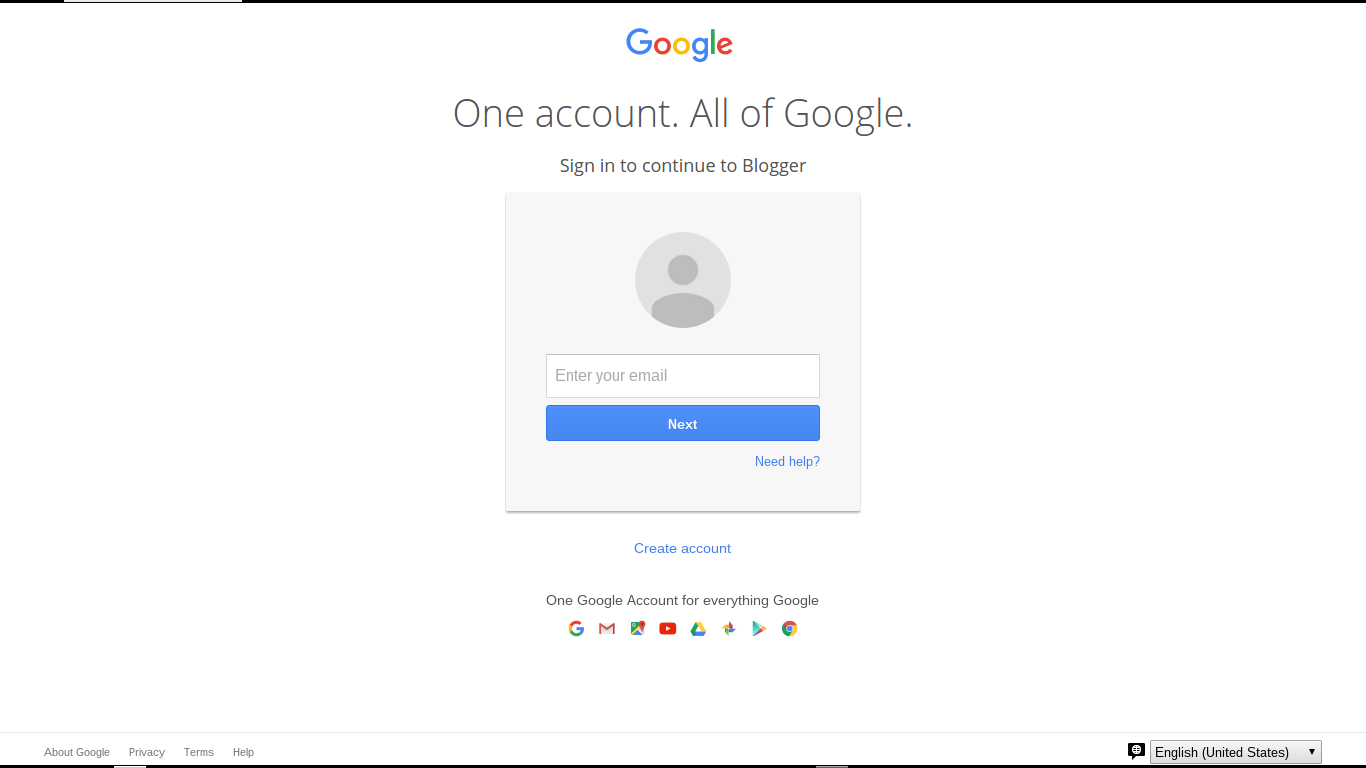
Sign in to continue to Google Friend Connect
Other than that label, what you see is the well known "One account" login display.

As with any Blogger / Google login, you can login to a GMail address based Blogger / Google account - or to a non GMail email address based Blogger / Google account. And, if you don't yet have a Blogger or Google account, there is the also familiar link to
Create an account
Clicking on "Create an account", you are given the standard Google "Create your Google Account" wizard.

As with any account creation scenario, I will once, again, remind you that creating a Blogger / Google account creates a responsibility. It is in your best interest to remember and secure the account name and password, and to religiously maintain all backup devices and features, such as backup email account, phone number, and secret question.

As with any Blogger / Google feature, use of the Google "One account" login is subject to your use of a computer with properly configured filters. You need proper filter settings, to permit popup windows, scripts (JavaScript), and third party cookies.

The Google "One account" display, when used for Following, may be subject to the same confusion, as with the Blogger login. Don't use the login account menu, without being aware of possible confusion.

The login process appears to run under "accounts.google.com", presenting cross site relationships with "blogger.com", "blogspot.com", and whatever country code domain, and / or custom domain might affect you, as you view your blog and other blogs.

Interestingly enough, once you are logged in to Following, and you prepare to Follow another blog, you still may get the choice of account hosts.
  • Following (Default)
  • Blogger
  • Google
  • Orkut
  • Netlog
  • Plaxo
  • Twitter
The Google "One account" login only replaces the authentication portion of Following. Just click on the "More options" link, instead of the initial "Follow this blog" button, for an intriguing complement of Following options.

>> Top

Thursday, April 3, 2014

The New Google Login, And Using Public / Shared Computers

I've written a few times about protecting your Blogger / Google account, when you use public / shared computers.

Generally, any concern about use of public / shared computers discusses cookies, which are simply invisible traces that you might leave behind when using any computer. If you only use your own computer - and never share your computer - this issue is probably of no concern to you.

If you use a computer that someone else, who you know, also uses, cookies are a small concern. If you use a computer that other people, who you don't know, also use - as in a public computer in a coffee shop or library - this should be a larger concern.

If you look at the Google login screen, you'll see a common option, on many login screens.
Stay signed in.
If you hover the mouse over the option, you'll see a small popup.
For your convenience, keep this checked. On shared devices, additional precautions are recommended. Learn more.
Clicking on "learn more", you get to read Securely signing in to Google.

The Google Help article mentions cookies as a significant risk to you, when using a public computer ("Devices used by lots of people").
Public computers, if well-maintained, automatically clear a user’s web history and cookies. If you’re unsure, we recommend that you use the private browsing feature of the browser. If private browsing isn’t available, clear the browser’s history, cache, and cookies before and after you use the device.
With a shared computer ("Devices shared with a few people"), the risk is less alarming.
If you only plan to use the device briefly, such as when visiting a friend or relative, we suggest using private browsing.

If you plan to use the device often (say, for example, it’s your family computer), then we suggest creating a user profile either in the operating system or in the browser so you can keep your information private from other users. We recommend you leave the "Stay signed in" checkbox selected to take advantage of Account Chooser and longer sessions. Learn how to add user profiles on an Android device or in Chrome.
And the final note.
If none of these security options are available to you, we strongly suggest you do not sign in to your Google Account. If you do sign in, we recommend deselecting the "Stay signed in" checkbox in case you forget to sign out.

I've discussed clearing cache, cookies, and sessions, in a few articles - and in more than a few forum discussions. In many cases, before the new Google Login (2014) was developed, cookies were moderately significant. Cookies, along with cache and sessions, are normal bits of data, which a knowleagable hacker might find hidden away, on a computer.

With the new Google login display, cookies are a more significant concern. Look at a typical Account Chooser login screen might look like, on a computer shared by a number of people who use Google products.

Would you want any later user of your computer, checking out Account Chooser, and finding your email address in plain view?


If you, personally, only use one Google account, and never use a public or shared computer, you may never see the Account Chooser login screen. If you do see Account Chooser, in its native state (un erased), you will see the account name ("Display Name" in Blogger) and email address of each Google account owner who has used the computer, since cookies were last cleared. Note that the screen print, shown here, has display name and email address, for each of the 5 previous users, erased.

With the Google login display (2014), and Account Chooser, we have gone from account vulnerability to any knowleagable hacker, to account vulnerability to anybody who cares to click on "Use a different account".

Obviously, when using a public computer - and probably a shared computer - you would not want to ever select "Stay signed in". Also, if you ever have to use a public computer, I would always use 2-Step Verification.

>> Top

Friday, March 21, 2014

Getting Out Of Draft Blogger

Occasionally, in Blogger Help Forum: How Do I?, we see a plaintive query
How do I remove my blog from using Draft Blogger?

Some blog owners use Draft Blogger because of a specific problem - then discover later, that use of Draft Blogger, in general, is not a good idea.

Generally, one simply logs out of Blogger, then logs into Blogger using the normal Blogger login.

Simply logging out, from Draft Blogger, won't always fix the problem.

Sometimes, though, simply logging out of Draft Blogger won't return the browser to normal.

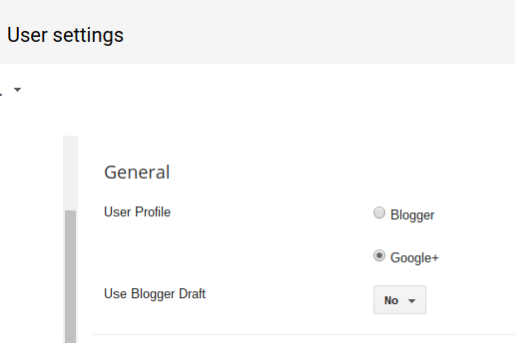
In the latter case, one must first clear the Draft Blogger setting, using the "User settings" dashboard page - where we see the key setting
Use Blogger Draft
Change that option to "No" - then clear cache, cookies, and sessions, and restart the browser, to remove all residual components of Draft Blogger.

Use the Settings - "User settings" dashboard page.


Use the Blogger "User settings" dashboard page.


Change "Use Blogger Draft" to "No".

Then, hit "Save settings".


Finally, login to Blogger, properly.

Finally, log into Blogger, using a normal Blogger login. Avoid any bookmarks, favorites, or other saved access URLs. And, be sure to login properly.

Tuesday, April 10, 2012

Bloggers Trying To Login, Seeing "The page isn't redirecting properly", Revisited

For some time recently, we've been seeing numerous reports from people in Blogger Help Forum: Something Is Broken, unable to successfully login to Blogger.
I cannot log into Blogger - I keep getting this error
The page isn't redirecting properly.

Firefox has detected that the server is redirecting the request for this address in a way that will never complete.
In a few cases, we identified the underlying cause of the problem as disabling or refusing to accept cookies, or similar overly aggressive layered security procedures and settings. Feedback from some forum members, who were able to provide details, suggests another cause. The problem may be simpler - or more complex - to resolve.

Some of the forum members, who reported this problem, also reported a problem with their Google+ accounts. Blogger blog owners, attempting to login to a Blogger account which uses a Google+ profile, generate a redirect to the Google+ servers. If the associated Google+ account has a problem, you have another cause of the redirection problem.

The solution here is simple - remove the Google+ association. Unfortunately, this can be done only when logged in to the Blogger / Google account.
  1. Fix the problem with the Google+ account. It may be possible, alternately, to revert from a Google+ profile, to a Google profile.
  2. Login to Blogger, and to Google.
  3. Transfer ownership of the blog(s), using the Permissions wizard and using two separate browsers or computers.
  4. Remember that you are now responsible for maintaining two Google accounts.
  5. Done.
But wait - why not simplify - just a bit?
  1. Fix the problem with the Google+ account.
  2. Change your Blogger account back to using a Classic Blogger profile.
Or, even simpler.
  1. Fix the problem with the Google+ account.

If you can fix the Google+ account problem, don't worry about the Blogger problem. Get back to work, on your blog. And don't do anything to break your Google+ account.

>> Top

Wednesday, April 4, 2012

Bloggers Trying To Login, Seeing "The page isn't redirecting properly"

Recently, we're seeing numerous reports from people in Blogger Help Forum: Something Is Broken, unable to successfully login to Blogger.
I cannot log into Blogger - I keep getting this error
The page isn't redirecting properly.

Firefox has detected that the server is redirecting the request for this address in a way that will never complete.
In a few cases, we are seeing a key clue to the cause of the problem.
This problem can sometimes be caused by disabling or refusing to accept cookies.
And this now looks like another case of overly aggressive layered security procedures and settings.

Some time earlier, we had reports of people being forced to repetitively login - and other times, people who reported seeing
Conflicting edit

There was more than one attempt to edit this resource at the same time. This may have been because you double clicked on a link or a button or because someone else is also editing this blog or post.
The latter would be seen at random times, when trying to maintain or post to the blog. Sometimes the problem would go away by back spacing and trying again - but generally, the best recovery would be to clear cache, cookies, and sessions, restart the browser, and try again.

In extreme cases, it would be necessary to laboriously check all cookie filters - and maybe also, to stop clearing cookies regularly.

Now, it looks like Blogger has rewritten their blog ownership / cookie handling / login procedure, similar to how they rewrote their commenting / cookie handling / login procedure, some time ago.

The bottom line is that the previously seen login loop, where the blog owner (or guest trying to comment) formerly was made to manually click on various links from screen to screen, is now being forced through an automatic loop between the login displays - and the login loop is now being detected by the browser.
Firefox has detected that the server is redirecting the request for this address in a way that will never complete.
Regardless of the exact symptoms - reported by people using Firefox, or any other browser - anybody desiring to publish comments (non anoymously) on any blog, or to publish posts or maintain one's own blog, needs to carefully check all cookie and script filters, and to consider the necessity of regularly clearing cookies.


(Update 2012/04/10): Latest reports of this problem indicate the involvement of Blogger accounts using Google+ profiles.

>> Top

Friday, January 6, 2012

A Google Account Does Not Have To Be GMail

Blogger uses the Google "One account" login to identify you, when your identity is important.

Occasionally, in Blogger Help Forum: Something Is Broken, we still see evidence of confusion.
Some time ago, Google started making users to sign in with a Google address. I did not want a Google email address, but since Blogger was requiring it, I had to make one. I never had any intention of using it, but only wanted to use Blogger. Why did Google make the sign in procedure for Blogger the same as Google mail?
This person, as with other Blogger blog owners, does not understand the difference between a Google account, and a GMail (Google email) account.

When Blogger changed their login screen, and started instructing us to
Sign in with your Google account
they were making the term "Google account" more inclusive - not making the term "Blogger account" obsolete, or less inclusive.

Your Google account may be based on your Blogger account.

A Google account, in this case, is based upon your current Blogger account. A Blogger account can be based on a GMail email address - or it can, just as easily (more easily, actually) be based on a non GMail email address.


What the %^&&? I do not use GMail!


Your identity, using Blogger, is provided with a Blogger account.

Whether you are going to use Blogger for commenting, as a blog Follower, as a blog owner, as a private blog reader, or a team blog member, your identity needs to be verified. This requires a Blogger account - it just does not have to be a GMail account, if you don't want GMail.

Please, allow your identity to be provided - when necessary.

You will need to use a computer that permits your identity to be checked. Computers with excessive security, that needlessly anonymise you, will be a problem, with many Blogger / Google features and services.

When you see a reference to "your Google account", don't spend time complaining about violation of your right to choose your email address. Just use your Blogger account.

Thursday, February 11, 2010

Blogger Accounts, And Blind Logins

One of the promises of Blogger, which makes a Blogger blog such an asset to the masses of the world, is the freedom to publish without being forceably identifiable.

Anonimity is a major advantage, for many who publish Blogger blogs. But there are a few downsides to anonymity - and one may be seen when we try to edit our blogs.

Some bloggers load a blog in the browser window, then click on the "Sign In" link in the navbar, in the expectation that they are signing in to that blog. For folks who only maintain a single Blogger account, and who have enabled the proper security settings, this will appear to be what's happening. But, it's not.

When you sign in to Google, you are using a double blind system.

Blogger requires you to tell them what account, and what password, you want used. They don't pick an account for you, based upon the blog currently displayed. This is one way that Blogger protects us, and lets us blog anonymously. The owner of a blog can hide his identity, if he tries hard enough.

If your cookies are properly enabled, the Blogger login process will remember what Blogger / Google account you used, most recently, and try to have you login using that account. If you are currently signed in to Analytics, GMail, Picasa, or any of many other Google products, you may already be signed in to Blogger too. This also happens when you, inadvertently, created a second Blogger account.

If
  • You display your blog before signing in to Blogger.
  • Your blog is owned by a Blogger account that's related to your Analytics, GMail, or Picasa account.
  • You always sign in to that account before signing into Blogger.
then it may appear that you are signing into your Blogger account based upon your blog, currently displayed. This is, however, a deceptive appearance.

When you login to Blogger, always check and verify what account is displayed for Account Name. Save yourself some trouble. Alternately, carefully verify ownership after you login.

If you become totally confused, clear cache, cookies, and sessions - then restart the browser, and start over. Better the extra effort, than one of many different confusions, so easily experienced.

Navigate» Become author for this Blog