Showing posts with label Template Problems. Show all posts

Sunday, July 2, 2017

Does Your Blog Need HTML Validation?

A few blog owners are concerned about blog network performance - and spend time validating and tweaking the template, based on advice from various third party services.
I don't know how to use W3C Validation, there are always errors displayed for my blog!
And we see periodic questions about validation - and sometimes reports about broken templates, with blog owners following the validation advice, blindly.

W3C Validation produces hundreds of errors, for every blog page.

I Tried Validation, For This Blog.

I used to tear my hair out, trying to fix my W3C validation errors, for this blog.

Check out the validation log, for this blog, as an example. See the size of the scroll tab? That's a 20 page report - of critical errors, in the blog home page.


See the size of the scroll tab? This display shows just the first page, of 20 or so.


Validation Is Useful, For Static Websites.

W3C validation is designed for HTML based, static websites - that are centrally located. Blogger blogs are XML based, and dynamic - and use the Google Content Delivery Network, which serves blog content from dozens of different data centres, worldwide, based upon the location of each individual reader.

With the Google CDN delivering content locally, to many readers, distance related network issues are less important - and with Blogger templates being maintained and tested by Blogger Engineering, a lot of the issues identified by validation are not easily resolved by the typical blog owner.

If you publish a Blogger blog, using a Blogger supplied template, work on content. Blogger manages the network settings, relevant to your blog, as it is served by the Google Content Delivery Network. You publish your blog - and let Blogger / Google worry about the networks, the servers, and the templates.

Custom / Third Party Templates May Benefit, In Specific Cases

It's possible that some blogs with third party templates, and non Blogger standard code, may benefit from validation.

If your blog has a non Blogger template, you could check out Blogger Developers or Stack Overflow - and ask for advice there. Or, try contacting the person / site that provided you with the template, and see what they can tell you.

But with a blog with a supported Blogger template, concentrate on content. Don't tweak the template HTML, unless necessary. Leave Blogger / Google to worry about network issues and the template.


Some #Blogger blog owners concern themselves about third party network performance analysis. Learn why some performance analysis advice may be unnecessary - and can be harmful to your blog.

https://productforums.google.com/d/topic/blogger/8plQKqdwSGg/discussion

Saturday, June 11, 2016

Recovering From A Corrupt Template - The Next Step

There are three possible dashboard wizards, used to recover a blog with a corrupt template aka "500 Internal Server Error".
  1. The Template Designer page.
  2. The Template page.
  3. The Template Editor ("Edit HTML") page.
With most blogs, one of the three can eventually be used, to install a clean, new template - and recover a blog that's offline because of the broken template.

Some blogs, unfortunately, cannot be recovered this way.

Some blogs have templates so badly broken, that no dashboard template wizard can be accessed - and used to restore the blog to operational status.

If there's no way to recover a broken blog by replacing the template, the next possibility is to recover the URL - and install a new blog at that URL.

  1. Create a new blog - with a clean, working, Blogger supplied template.
  2. Swap URLs between the old and new blogs.
  3. Export content from the broken blog - and Import to the new blog.
  4. Transfer / update Followers.
  5. Rebuild the template, and add gadgets.
  6. Provide notice to your Followers, readers, subscribers, and other viewers.

Create a new blog - with a clean, working template.

Use the dashboard "New Blog" button, and create a new blog. You'll only create the new blog, in this case, to recover the URL of the broken blog - so just use a random, non valued URL.

Choose a template similar to the one on the broken blog, from the dashboard Template page - and get your new blog online. Use a Blogger standard template, until you are satisfied that the problem won't continue.

Swap URLs between the old and new blogs.

Hoping that you can access the Settings - Basic ("basicsettings") page - first rename the URL Of the broken blog, to a second random, non valued URL. Then you can rename your new blog - created above - to the URL previously used by the broken blog.


Just Edit "Blog Address", twice, to swap URLs.

First, for the broken blog, to free up the current URL - then, for the new blog, to recover the current URL.


Now, your broken URL is back online, with a clean template - though without content.

Export content from the broken blog - and Import to the new blog.

Use the "Import & back up" wizard at the Settings - Basic ("othersettings") page for the broken blog, and export comments, pages, and posts. Then use the wizard for the new blog, and import the content just exported.

Transfer / update Followers.

If the broken blog uses Blogger Followers for community building, and you had a significant Followers community, the community will remain on the old, broken blog. This is the one down side of recovering a broken template using this technique.

Fortunately, the only specific problem is the effect upon the Followers community. The other half of Following - the blog feed - will be re established with the new blog, which will now have the desired URL being recovered. And the sooner you get the blog back online, the sooner you can rebuild / recover your Followers.

Rebuild the template, and add gadgets.

If you periodically back up the template, as you tweak it, this will be the easiest step in the recovery. Of course, since you are here because the template is broken, maybe you should rebuild the template, one step at a time. Try to not repeat the previous mistake.

Then add gadgets back, one at a time - and test carefully.

Provide notice to your Followers, readers, and viewers.

If you care about your community - Followers, readers, subscribers, and other viewers - a new post, briefly admitting to your mistake might be a good idea. You can even display your new post, as a Featured Post.


Sometimes, it's not possible to recover a broken #Blogger blog, using any of the Template dashboard pages, with a blog sidelined by a "500 Internal Server Error" broken template. If the URL has any value to you - or your viewers - you can recover it, using a new blog.

target="_blank"

Thursday, June 9, 2016

Inaccessible Comments, On Some Popular Posts

Viewing comments, on some popular blogs, one may get the idea that not as many comments are being published, as are immediately visible.

With a large comment complement, comments are paginated - with some comments hidden behind a link, captioned "Load more". The "Load more" link is JavaScript based - and there is a problem.

The "Load more" link does not always work, on all blogs.

Comments on some blogs may be unreadable - with the "Load more" link not operational.


Some posts never display all comments.


Look at the bottom of the page, below the post.


And there is the "Load more" link.


And the link, as seen when one mouse over it, is shown to be JavaScript based.


And clicking on the link yields the caption "Loading ...".


And "Loading ..." never goes away - and we get no view of the missing comments.


I've seen this problem with blogs using both dynamic and non dynamic templates.

Both dynamic templates, and non dynamic templates, appear to use comments paginated behind "Load more" - and may exhibit this problem. I've seen this problem, reported in Blogger Help Forum: Get Help with an Issue, for both template types.

I have reproduced this problem, using two blogs.

Here are two recently reported cases, reproduced in my testing today. I do not know how long both cases may be active.

http://slifkinchallenge.blogspot.com/2016/05/thank-you-yehoshua-duker-and-yosef.html
https://productforums.google.com/d/topic/blogger/RotUfv8AwuU/discussion

http://istanbulkonstantinopel.blogspot.com/2014/03/study-in-turkey-2.html
https://productforums.google.com/d/topic/blogger/7Yau3KKR9mo/discussion


Noting that both blogs are (natively) published in countries that are subject to local country codes (Israel and Turkey, respectively), I will deny that to be a simple affinity - since I viewed both blogs from my browser, as "blogspot.com", as I reproduced the problem. That said, that is an interesting coincidence, no?

There are several possible causes of this problem. Adding the above observation, some of these causes may be more or less relevant.

  • Comments feed setting.
  • Comment feed content / corruption.
  • Cookie / script filters.
  • HTTPS Redirect.
  • Occam's Razor.
  • Post template corruption.

Comments feed setting.

Features like the comment reply option, and blogs published to dynamic templates, require a full comment feed. It's possible that comment pagination, behind JavaScript links, is similarly sensitive to the comments feed setting.

This detail will affect everybody - both blog owner(s) and reader(s) alike. And it will probably affect all posts, uniformly.

The solution for this problem would involve checking - and correcting - the comments and feed settings, for the blogs involved.

Comment feed content / corruption.

Similar to the problem with the Blogger blog post published location, it's possible that some unknown detail in the data could interfere with script functionality.

If the problem involves content in one post - or a comment on one post, it's possible that comments for one post could be affected; but other posts could paginate comments successfully.

This detail would probably affect everybody, uniformly.

The solution for this problem will require determining what feed content detail causes the problem. This will probably involve affinity diagnosis.

Cookie / script filters.

Any problem which involves a JavaScript based link, both cookies and scripts are always going to be involved. Any filter that interferes with either cookies (identity) or scripts (link functionality) will always be a possibility.

Filters may affect either blog owners and / or blog readers, uniquely. A problem that involves some owners / readers will likely involve filters.

Thanks to the effect of country local domains, cookie / script filters may affect individuals geographically.

The solution for this problem is to check / open up script filters - and then check / open up cookie filters.

HTTPS Redirect.

Both blogs, identified above, appear to not be using the "HTTPS Redirect" option. It's not impossible that this is another feature, broken by the SSL Rollout.

Occam's Razor.

Considering the most simple alternative, is it possible that paginated comments are simply inoperative? Maybe, because of (or incidentally involving) the SSL Rollout??

Post template corruption.

Comments are part of the post template. It's likely that proper comment functionality also requires a clean post template. This detail will probably affect everybody - though it's possible that there could be code that is sensitive to some owners / readers, but not others.

The solution for this problem is to reset the post template, on the blogs involved.

The bottom line.

This problem, if not incidentally solved by a Blogger code change, will probably not be diagnosed, immediately.

More examples of this symptom are badly needed. Right now, we have seen only a handful of people with blogs that are popular - and generate comments in sufficient volume - and have reported this problem.


Some #Blogger blog owners, who publish blogs with posts that receive large volumes of comments, report inability to display all comments published. Comments, when displayed in large volumes, are paginated behind JavaScript based links - and some links, when clicked, don't seem to work.

https://productforums.google.com/d/topic/blogger/7Yau3KKR9mo/discussion
https://productforums.google.com/d/topic/blogger/RotUfv8AwuU/discussion

Friday, April 22, 2016

Blogger Magic - Using An HTTP Trace

An HTTP trace is a very useful tool, for diagnosing and documenting connectivity issues, and many other blog problems.

I use the Rex Swain HTTP Viewer, for this purpose. HTTP Viewer lets you package a given display, in the URL, so you can give simple instructions (accompanied by an unavoidably complicated link):
Click on the link:
http://www.rexswain.com/cgi-bin/httpview.cgi?url=http://klarfamilylife.blogspot.com&uag=Mozilla/5.0+(X11%3B+CrOS+armv7l+7834.70.0)+AppleWebKit/537.36+(KHTML,+like+Gecko)+Chrome/49.0.2623.112+Safari/537.36&ref=http://www.rexswain.com/httpview.html&aen=&req=GET&ver=1.1&fmt=AUTO
And when the link is clicked, the necessary HTTP trace is displayed. There is no need to provide instructions how to actually enter the necessary values, on the HTTP Viewer home page, to generate the necessary display.

I use the Rex Swain HTTP Viewer, for diagnosing and documenting custom domain, malware, spam classification, and other connectivity issues.

Start by verifying URLs involved.

Whenever possible, make a screen print, and a text copy, of the Blogger dashboard Publishing wizard, at Settings - Basic.

Here's a live example, of HTTP Viewer use.

http://www.rexswain.com/cgi-bin/httpview.cgi?url=http://klarfamilylife.blogspot.com&uag=Mozilla/5.0+(X11%3B+CrOS+armv7l+7834.70.0)+AppleWebKit/537.36+(KHTML,+like+Gecko)+Chrome/49.0.2623.112+Safari/537.36&ref=http://www.rexswain.com/httpview.html&aen=&req=GET&ver=1.1&fmt=AUTO

Start from http://www.rexswain.com/httpview.html.


Note, HTTP Viewer only works in HTTP mode. SSL is not supported. Fortunately, right now, the automatic "http:" to "https:" Blogger redirect, which is not optional, does not affect HTTP Viewer.


Add the URL of the blog, and click on "Submit".


This generates a lot of text. I'm not going to explain all of it, in this post.


Since Blogger blogs have no post limit, I'll have more posts, later, that will involve HTTP Viewer displays.


But here's the second page, of the above display.


And here is the typical excerpt, that I will make, and display.

http://www.rexswain.com/cgi-bin/httpview.cgi?url=http://klarfamilylife.blogspot.com&uag=Mozilla/5.0+(X11%3B+CrOS+armv7l+7834.70.0)+AppleWebKit/537.36+(KHTML,+like+Gecko)+Chrome/49.0.2623.112+Safari/537.36&ref=http://www.rexswain.com/httpview.html&aen=&req=GET&ver=1.1&fmt=AUTO

Sending request:

GET / HTTP/1.1
Host: klarfamilylife.blogspot.com
User-Agent: Mozilla/5.0 (X11; CrOS armv7l 7834.70.0) AppleWebKit/537.36 (KHTML, like Gecko) Chrome/49.0.2623.112 Safari/537.36
Referer: http://www.rexswain.com/httpview.html
Connection: close
• Finding host IP address...
• Host IP address = 172.217.0.1
• Finding TCP protocol...
• Binding to local socket...
• Connecting to host...
• Sending request...
• Waiting for response...
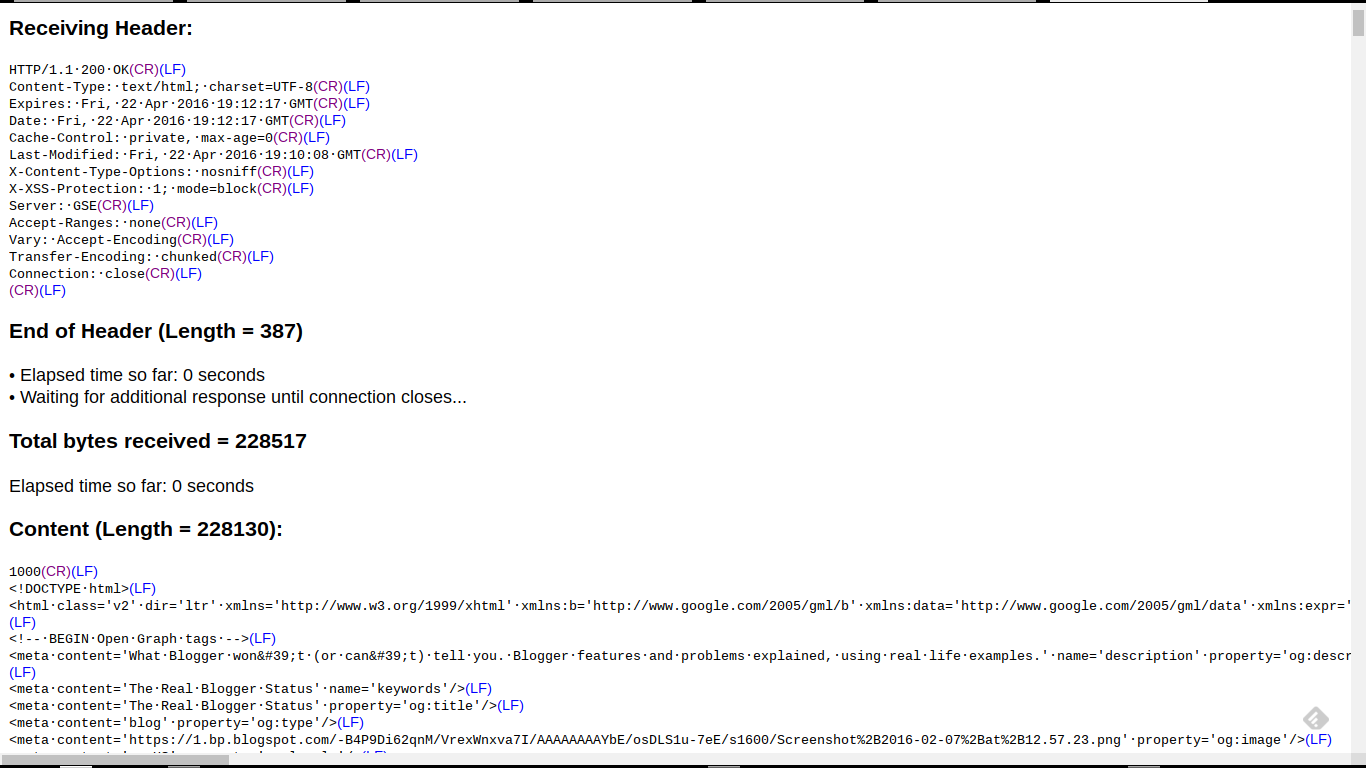
Receiving Header:

HTTP/1.1·500·Internal·Server·Error(CR)(LF)

This is an example of a notorious "500 Internal Server Error" - which right now is plaguing various blog owners who have corrupt templates. This is what we see with many blogs, when people report various bX codes, when using several Blogger dashboard pages.

  • Template.
  • Template - "Customize" (aka "Blogger Template Designer").
  • Template - "Edit HTML" (aka "Blogger Template Editor").

Here's a second live example.

http://www.rexswain.com/cgi-bin/httpview.cgi?url=http://blogging.nitecruzr.net/&uag=Mozilla/5.0+(X11%3B+CrOS+armv7l+7834.70.0)+AppleWebKit/537.36+(KHTML,+like+Gecko)+Chrome/49.0.2623.112+Safari/537.36&ref=http://www.rexswain.com/httpview.html&aen=&req=GET&ver=1.1&fmt=AUTO

Here, we have an HTTP trace from this blog, http://blogging.nitecruzr.net/.


And, my typical display - which you might see, as an "HTTP trace excerpt", in a custom domain connectivity diagnosis.

http://www.rexswain.com/cgi-bin/httpview.cgi?url=http://blogging.nitecruzr.net/&uag=Mozilla/5.0+(X11%3B+CrOS+armv7l+7834.70.0)+AppleWebKit/537.36+(KHTML,+like+Gecko)+Chrome/49.0.2623.112+Safari/537.36&ref=http://www.rexswain.com/httpview.html&aen=&req=GET&ver=1.1&fmt=AUTO

Sending request:

GET / HTTP/1.1
Host: blogging.nitecruzr.net
User-Agent: Mozilla/5.0 (X11; CrOS armv7l 7834.70.0) AppleWebKit/537.36 (KHTML, like Gecko) Chrome/49.0.2623.112 Safari/537.36
Referer: http://www.rexswain.com/httpview.html
Connection: close
• Finding host IP address...
• Host IP address = 74.125.25.121
• Finding TCP protocol...
• Binding to local socket...
• Connecting to host...
• Sending request...
• Waiting for response...
Receiving Header:

HTTP/1.1·200·OK(CR)(LF)

<meta·content='blogger'·name='generator'/>(LF)
<link·href='http://blogging.nitecruzr.net/favicon.ico'·rel='icon'·type='image/x-icon'/>(LF)
<link·href='http://blogging.nitecruzr.net/'·rel='canonical'/>(LF)
<link·rel="alternate"·type="application/atom+xml"·title="The·Real·Blogger·Status·-·Atom"·href="http://blogging.nitecruzr.net/feeds/posts/default"·/>(LF)
<link·rel="alternate"·type="application/rss+xml"·title="The·Real·Blogger·Status·-·RSS"·href="http://blogging.nitecruzr.net/feeds/posts/default?alt=rss"·/>(LF)
<link·rel="service.post"·type="application/atom+xml"·title="The·Real·Blogger·Status·-·Atom"·href="https://www.blogger.com/feeds/24069595/posts/default"·/>(LF)

The latter connectivity diagnosis might be a part of my 12 link affinity / differential connectivity test.

My trace excerpts include details which I, personally, decided are most useful for me. You may find additional - or less - details to be useful, for you.

Here, we see just two examples, of my HTTP traces. There are an infinity of possibilities.


An online HTTP trace is a useful diagnostic tool, when diagnosing and identifying many different #Blogger problems. Custom domain, malware, spam classification, and other connectivity issues may be diagnosed and documented.

Sunday, March 20, 2016

Recovering From A Corrupt Template - Persistence

Of the many Blogger Mysteries that confound blog owners and readers, none are more obscure than the many bX codes.

Some problems, reported in Blogger Help Forum: Get Help with an Issue, start so innocently.
As I edited the Template HTML, I saved my changes - and the bX error suddenly appeared.
Each different bX code refers to a different problem, with Blogger in general. Of the bX codes that refer to template corruption, each different bX code may refer to a different template corruption problem.

When a template corruption problem can be reset, the resetting process may involve repeated use of one or more dashboard pages.

Different problems may enable - or prevent - use of a different dashboard page. For problems with multiple causes, you may have to use each different wizard, persistently.

  1. The Template Designer page.
  2. The Template page.
  3. The Template Editor ("Edit HTML") page.
  4. If the blog is not operational, you start again.

Unfortunately, some problems may prevent use of all 3 pages. For the problems that permit use of one or more pages, you try each available page, repeatedly, until the blog becomes operational.

To access each page, you may need to bypass the dashboard menu.

The Template Designer page.

The Template Designer is used for one task - "Remove customizations".


The Template Designer.


"Remove customizations" may be the simplest reset that you may try - when possible. Some customizations, when removed, may enable subsequent use of the Template page, or the Template Editor.

The Template page.

The Template main page is used for two tasks.

  1. Backup / Restore the existing template.
  2. Get a new template.


The Template main page.


Some problems, when reset using the Template main page, may enable subsequent use of the Template Designer, or the Template Editor.

The Template Editor ("Edit HTML") page.

The Template Editor ("Edit HTML") is used for two tasks, as an alternate to the Template main page. Also, it may be used to reset any "rgba" colour combination problems.

  1. Backup / Restore the existing template.
  2. Get a new template.

For template corruption problems that prevent use of the Template main page, the Template Editor - combined with a second blog, where a clean template is developed and tested - can be used.


The Template Editor (aka "Edit HTML").


Some problems, when reset using the Template Editor, may enable subsequent use of the Template Designer, or the Template main page.

If the blog is not operational, you start again.

If you get a new bX code, you repeat the above sequence. Some problems, with multiple causes, may require repeated retries.

In extreme cases, you may end up creating a new blog at the URL.


Some #Blogger template problems, which lead to a bX code display, may have multiple causes - and all causes may require solution, to make an affected blog operational. With some causes preventing solution of others, a repetitious use of the various dashboard pages may be required - to solve some template corruption problems.

Tuesday, February 23, 2016

Recovering From The Corrupt Template / "Error 500"

We're seeing a few reports, this week, in Blogger Help Forum: Get Help with an Issue, about blogs with broken templates.
I tried to log on to my blog, and it shows up an error message. I've done it several times on different browsers, but no change: the error code is bX-uukqqu.
It appears that the "bX-uukqqu" is from the owner attempting dashboard access. Trying to view the same blog, I see the ubiquitous "bX-v2vqfh".

Both codes reference blogs which show up, in an HTTP trace, with the monolithic message "500 Internal Server Error" - and tells us that this is one more blog with a broken template.

If you, the owner of a blog with a broken template, can access the Template dashboard page, you may be able to recover the template.

Some blog owners report that adding a Template Backup / Restore has helped to resolve their own bX code / "Error 500".

  1. Backup the template ("Download full template").
  2. Get a clean Blogger standard template.
  3. Restore the template ("Upload" the template that you just downloaded).


If you're lucky, your version of the "bX-uukqqu" (dashboard) / "bX-v2vqfh" (public) can be resolved, by a quick template download then upload.


You may need direct access to the Template page, bypassing the dashboard menu - though if you can view the blog, the "Design" navbar link will provide you that ability. If you can't access the Template page at all, you may be able to clear some bX codes, by using the Template Editor aka "Edit HTML".

If any of this works, your blog will be back in service. If not, you will at least have a backup copy of the template.

If the template is still broken, you now have three choices.

  1. Leave the blog as it is now, broken - until Blogger Engineering finishes diagnosing and fixing the actual cause of the template corruption.
  2. Get a fresh new template. When Blogger Engineering finishes diagnosing and fixing the actual cause of the template corruption, you can try restoring the template copy that you just backed up.
  3. Try a persistent solution.

And whether this works - or not - or even if you can't use it, right now, you can have a template backup. And one day, this backup may be useful.


A few Blogger blog owners, reporting bX codes when trying to access their dashboards, have found that accessing the Template page directly, then doing a quick back / restore, may clear the bX codes. This suggests that Blogger Engineering is beginning to test solutions to the ubiquitous "Error 500" broken template problem, that have been afflicting blog owners for some time.

---

Friday, February 5, 2010

Duplicate Blog Posts? Remove The Duplicate!

As a savvy consumer, you likely love to hear about offers for 2 for the price of 1, of something that you buy frequently. That's a great deal, normally.

It's not for blog posts, though.

When you start to see double in your blog, chances are that you duplicated the Blog Posts entry in the template. It's not hard to fix, fortunately.

Edit the blog template, using the dashboard Template - "Edit HTML" wizard. Do not expand or unfold any widgets.

If you unfold either 'Blog1' or 'Blog2', you will have to find the end of the unfolded gadget section, which could be hundreds of lines later. If you delete 1 too many, or 1 too few, unfolded lines, you will get a syntax error.
Error parsing XML: ... The element type "b:section" ...
Deleting just one line (see below) is way easier, believe me.

Look for two lines, in the Body of the template, which may or may not be immediately next to each other in sequence:

<b:widget id='Blog1' locked='true' title='Blog Posts' type='Blog'/>

...

<b:widget id='Blog2' locked='true' title='Blog Posts' type='Blog'/>
Remove:
<b:widget id='Blog2' locked='true' title='Blog Posts' type='Blog'/>
Leaving:
<b:widget id='Blog1' locked='true' title='Blog Posts' type='Blog'/>

Save the change. You will get a stern warning when you save, demanding that you confirm that you really want to delete "Blog2". Obviously, you do. And don't forget to clear browser cache, and restart the browser, to reliably test your change.

Remember to save a copy of the template, before and after doing this.

And now, since you're here, and if you just removed a duplicate post template from your blog, help me to help others, and think why you're here.
  • What changes have you made, to the blog?
  • What accessories have you installed?
  • Any templates - Blogger or third party? - installed?
  • Any changes between classic and layout templates?
  • What Blogger features / wizards do you use?
    • Draft Blogger?
    • New, or Old, Post Editor?
  • What third party services have you ever allowed to access the blog directly, to install something?
Solving this problem starts with you.

>> Top

Wednesday, January 6, 2010

Blogger Blogs Redirecting To "smashingfeeds.com"

This week, we are seeing a few reports from anxious bloggers that their blogs are redirecting to mysterious URLs containing the domain "smashingfeeds.com". This is somewhat reminiscent of the "blogoholic.info" hijacks of June 2009.
My blog site has been hijacked & redirects to: http://searchinvented.com/?flrdr=yes&nxte=js&dn=smashingfeeds.com&fp=57S


Immediate reports from some bloggers suggest that removal of a possibly recently installed "Tweet This" gadget may be the most likely solution, when faced with this problem.

If you can access the "Page Elements" wizard, and if you have previously installed a "Tweet This" gadget on your blog, that's where you should start. Other blogs have the code installed directly into the template, and will have to use the "Edit HTML" wizard.

As with the "blogoholic.info" redirect, this exploit has been seen to cause corruption of the blog or gadget template, which may redirect you to "smashingfeeds.com" when you try to access the "Edit HTML" or "Page Elements" wizards. If you have this problem, you'll have to find out the blogID, then reference "Edit HTML" or "Page Elements" directly by URL.


In one case, the "searchinvented.com" / "smashingfeeds.com" redirect is being found on a blog that has a "falling snow" gadget.


After removing the offending code, don't forget to clear cache, before testing your change!

>> Top

Thursday, June 5, 2008

Blogger Spacing Issue Fixed - June 2008

There were many new features introduced in New Blogger 2006 - some appreciated, others not so. One of the latter category, and not understood by everybody, was the change in vertical line spacing, introduced into a blog by the presence of an indenting element such as "<blockquote>" or "<ul>". This issue was first noted the month New Blogger 2006, and the Layouts templates, was rolled out.

In March, 2008, the problem was acknowledged. This week, it was fixed.
This has been fixed in the master copies of the blog widget and the template CSS.
As noted below by Pete, if your blog has a completely non-edited template, it was upgraded already. If not, and if your template is not too customised, you can get the fix yourself, using Layout - Pick New Template, and getting a new copy of the template that you're using.

I note that the stated way of integrating the fix into an existing template
find the .post p { line in your CSS and move the line-height line into a new .post {} CSS block
was done some months ago, as the tested workaround for the problem, which I implemented in this blog, as I wrote that article.

In my test blog, you can see a demonstration of a post that looks like it should. My test blog uses a clean template, re acquired when this post was originally written, and after the Blogger changes were made.

To make this blog look like that, I had to do a bit of template editing. Besides the changes enumerated in my earlier post, I had to tweak the CSS for the "<blockquote>", "<li>", and "<pre>" text elements. You may be able to think of additional text elements which need similar treatment. Or, maybe you like a more open spacing (maybe "1.4em", or maybe the same "1.6em"). It's your blog, so it's your choice. This is my choice.

.post blockquote {
line-height:1.2em; <== Add this line
margin:1em 20px;
}
.post blockquote p {
margin:.75em 0;
}
.post li { <==
line-height:1.2em; <== Add these lines
} <==
.post pre { <==
line-height:1.2em; <== Add these lines
margin:1em; <==
} <==

Now, note the relatively open vertical spacing (1.6em) in the main paragraphs, and the tighter vertical spacing (1.2em) in the above indentation ("<pre> ... </pre>"). This relative spacing should now be consistent in this blog.

If you make these changes, and your blog doesn't look like my demonstration (here) or my test (my other blog), maybe you should consider simply getting a new copy of your template. If you haven't made too many changes in the template HTML, that would certainly have more possibility of yielding the right results.

It's your dime. At least, you should now see that it's possible to get your blog looking right.

>> Top

Monday, May 26, 2008

BlogSpot, And The 404 Error

For some time now, blogs published to a custom domain, and previously working, have been (apparently) randomly yielding a new monolithic error when being read.
Not Found
Error 404


Recently, owners of blogs supposedly not associated with custom domains have complained of this oddity also.


Why not at least
The blog you were looking for was not found.
or maybe even
Blog not found

Sorry, the blog you were looking for does not exist. However, the name xxxxxxx is available to register!


If your BlogSpot blog, not now and never previously part of a custom domain, is showing this symptom, please comment here with the blog name. If you're suffering from this idiosyncrasy, silence won't get the problem fixed.

>> (Update 5/28): Blogger Support has suggested a possible (distant) connection between template corruption and observation of this symptom.

>> Forum thread links: bX-*00080

>> Copy this tag: bX-*00080

>> Top

Thursday, March 27, 2008

Blogger Spacing Issue Acknowleged

When "Beta" Blogger, later known as New Blogger 2006, was first rolled out, there were many new features, and improvements over "Old" Blogger, noted. There was also one feature, that was not seen as an improvement, noted.

When you include any indenting block of text in your blog post,
<blockquote> ... </blockquote>
<ol> ... </ol>
<ul> ... </ul>

for instance, the spacing of the posts, below the indenting block, would change. This makes the entire blog look sloppy.

Several workarounds were identified by various bloggers; not any one was simultaneously clean, effective, and simple, however.

After repeated complaints and reports, Blogger finally acknowledged the problem. Yet, it's still not fixed.

Blogger calls it "Cosmetic". We call it sloppy.

>> Top

Navigate» Become author for this Blog