Showing posts with label Third Party Products. Show all posts

Tuesday, October 11, 2016

Custom Domains And HTTPS Redirection Code

As most of us know, Blogger HTTPS support does not include custom domain publishing.

The advantages offered by HTTPS access are widely advertised - and have led to envy between blog owners who publish to custom domains, and native BlogSpot blog owners proudly advertising their new HTTPS connectivity.

Long ago, we saw possibly malicious code which helps our readers avoid using country code aliases, to read our blogs from an aliased country. Recently, there was dodgy code which blocked HTTPS mode, to read a customised blog.

Now, we have custom code to force HTTPS access, for BlogSpot published blogs.

Along with providing code to help blog owners avoid country local domain aliasing, some marginally helpful hackers are providing code to help blog owners force reader access to HTTPS.

Some blog owners always wanted HTTPS to be used, to access their blog.

Some blog owners wanted their readers always using HTTPS to access their blogs, before forced HTTPS access became an option. They Googled, and found, semi helpful hackers who provide clever code to force the "HTTP --> HTTPS" redirection.

<script type='text/javascript'>
$(document).ready(function() {
  $("a[href^='http://']").each(
    function(){
      if(this.href.indexOf(location.hostname) == -1) {
        $(this).attr('target', '_blank');
      }
    }
  );
  $("a[href^='https://']").each
    function(){
      if(this.href.indexOf(location.hostname) == -1) {
        $(this).attr('target', '_blank');
      }
    }
  );
});
</script>

This is clever code - when only BlogSpot access is involved. When you add BlogSpot to custom domain redirection, it becomes another "404".


Adding this clever code is an excellent solution - until the blog owner forgets about it, and later upgrades to a non BlogSpot custom domain.

With a custom domain published blog, the redirection becomes a problem.

The added code contains no exception to permit custom domain published blogs to remain in HTTP mode. When accessing an otherwise properly setup custom domain published blog, from a reader using the "blogspot.com" URL, this prevents the BlogSpot to domain redirect from operating.

BlogSpot URLs, which should redirect to the HTTP published custom domain URL, instead redirect to a non existent HTTPS URL - and result in another "404". As the custom domain URL becomes more commonly used for a recently published blog, confusion increases when the rarer BlogSpot URL reference is encountered.

My blog has been using the domain URL for months, why is this happening now?

The problem involves dual redirection - to "https:" mode, and to the custom domain.

After painful problem diagnosis, we find the clever redirection code buried in template HTML - and we see that the blog reader is starting from the BlogSpot URL, and using the BlogSpot to domain redirection, to access the blog.

With blog access redirected to "https:" mode, then subsequently to the custom domain URL, the readers sees a "404" - because the custom domain URL is not available as "https:" content.

This problem will become increasingly rarer - but not extinct.

As self caused custom domain victims become rarer, this way of breaking ones own blog will become more obscure - and it's likely that some cases will go, unsolved. This will be similar to the problem of un migrated classic templates, which has increasingly less experienced support.

If you must install unsupported template tweaks into your template - consider the long term effects. Learn to recognise a problem that you have caused, to your own blog.

Not every helper will realise that you have added custom redirection code - and when looking at the problem code, when a problem is reported, will recognise it for what it is. Your problem may remain your problem - at least, until Blogger Engineering completes Blogger SSL integration (may this happen soon).


Some blog owners have added clever HTTP to HTTPS redirection code, acquired from helpful third party providers, installed in the template. When later publishing a blog to a custom domain, this code will prevent proper blog access - and as installed, may not be easily recognised.

https://productforums.google.com/forum/#!category-topic/blogger/bl5W39BKX4U

Saturday, July 2, 2016

Blogger Magic - Third Party Templates

There are millions of Blogger blog owners - and each owner has their own idea, how their blog should look.

Not every blog owner is willing to settle for using a Blogger supplied template. Some blog owners design their own templates - and others choose templates provided by non Blogger developers.

Some blog owners - even those with no technical background - choose third party supplied templates, and demand instructions in Blogger Help Forum: Learn More About Blogger. Not every blog owner can be supported, according to their personal level of need.

It's OK for you to install a new third party template, for your blog - though you should plan to do some extra work.

Third party templates should include some installation instructions.

A template publisher should provide instructions for uploading and installing their template. Installation procedures may vary, however.

  • Scripted install.
  • "Theme" Restore.
  • "Theme" "Edit HTML".

Scripted install.

If the template publisher is honourable, using an install script, provided by the template publisher, can be the most reliable install procedure. A well written script can extract the template of your choice from the publishers library, copy it to your blog, and tweak the install to your satisfaction.

You do nothing other than select the template, and maybe some key options - and provide access to the dashboard. The script does all of the work.

This is similar to the selections on the Blogger dashboard "Theme" page - you simply select the template that interests you, and the script does the rest.

Giving control of your Blogger account, to an unknown third party, is not always the best idea, however.

Theme Restore.

If the template publisher provides a template as an XML file, and describes the template as "for Blogger", you can install the template from the dashboard. You will first download the template of your choice, to a local computer.

With a template downloaded locally, you use the Blogger "Backup / Restore" wizard, in the dashboard Theme page.


Start with the dashboard Theme page.


Hit the "Backup / Restore" button.


Hit the "Choose File" button.


Now, you have the file manager, provided with your computer. Select the file, containing the template just downloaded.


The "Backup / Restore" wizard is part of the Blogger dashboard. The template will be selected, using the file manager wizard on the computer being used.

Theme "Edit HTML".

This is the most universal procedure - if the template is provided as HTML. Just use the Blogger "Edit HTML" wizard, in the dashboard Template page.


The simplest install uses "Edit HTML", from the dashboard Template page.


Copy the HTML or Text file content, into the window.


In some cases, you may have to do some work, to use an HTML template.

It's your blog - and the template choice is yours too.

You can use any acceptable third party blog template. Many blog features will perform best, though, if you use the Blogger supplied post template.

To ensure up to date Blogger code, always refresh the post template, after installing a third party blog template.

And as always, I'll suggest that you backup the template, before and after installing a custom template.

If you install a third party template, you may have to support your blog on your own.

Please understand that Blogger won't be able to support your third party template - that is the responsibility of the template publisher. Problems with your blog, after installing third party accessories, may be yours to resolve.

Try and choose a reliable template, from a publisher with a past - and future.

The shinier and more feature rich your template needs are, the more carefully you should choose your template publisher. Even if the template that you choose works today, will it work next month?

When Blogger adds a new feature, next week, you can bet that they won't test their changes against the third party template that you're using. And even if your chosen template publisher is careful to test any Blogger changes, their testing won't start until Blogger makes their changes public.

And any problems that they discover will be yours to deal with, until a solution is developed and tested - and you install the corrected template.

If you choose a template made by a startup publisher, and you're their first / only customer, they may get a new day job, next month. The next time Blogger makes a change that requires an update to your template, they may not answer your plea for help.

With no support, you'll be left with one solution - revert your blog to a standard Blogger supplied and tested template.


There are millions of #Blogger blog owners - and each owner is different. Blog design - and templates used - will vary similarly.

Some blog owners cannot be satisfied by the Blogger supplied template library - and require third party produced templates.

Thursday, June 16, 2016

Custom Domain Migration, And Redirection Blocking

We see occasional frustration, in Blogger Help Forum: Get Help with an Issue, involving broken or unreliable custom domains.
I setup the Custom Domain properly, following the Google directions.

For some of my readers, my custom domain is not opening. I can see it is going in an infinite loop in the browser - and after a long time, it's throwing errors. My domain is setup, properly. Why do I have to deal with this?
And we will investigate - and in many cases, we find the domain is setup properly.

Some custom domain published blogs have problems, which have nothing to do with the domain setup.

Some custom domain problems involve custom code, added to the template, long ago.

Not everybody is in favour of the ongoing Blogger efforts to convince blog owners to force their readers to use HTTPS / SSL, in blog access.

A number of hackers are making their websites popular, by providing code that lets blogs block forced HTTPS access - just as they provided code that blocked local country domain redirection. Some blog owners add this dodgy code, to their blogs.

This hacking lets blog owners publish their blogs, and use accessories and gadgets that only support HTTP access. Unfortunately, with third party code, you get what you get.

Some third party code, which blocks HTTPS blog access, works OK - for a while.

When a blog is published to a custom domain, redirection to "blogspot.com" causes a redirect loop - or a security check.

<script type='text/javascript'>
var blog = document.location.href.toLowerCase();
if (!blog.match(/\.blogspot\.com/)) {
  blog = blog.replace(/\.blogspot\..*?\//, ".blogspot.com/ncr/");
  window.location.replace(blog);
  }
</script>

This is clever code, seen some time ago when used to block country local domain redirection. Then, as now, some blogs might be deleted or locked as malware hosts - or the blogs would become intermittently inaccessible.

Is the unreliability appropriate? You can add what code you like, to your blog. Eventually, what you add may cause you problems.


Some #Blogger blog owners add clever code, to block HTTPS Redirection, to their blogs. This is the same hacker provided code, used long ago to block local country domain redirection.

Like country domain redirection, the code added may work fine, for a while. Eventually, the blog will be deleted / locked for malware hosting - or will start throwing 404 errors and similar confusion.


https://productforums.google.com/forum/#!category-topic/blogger/71k8xOXxByI

Monday, May 23, 2016

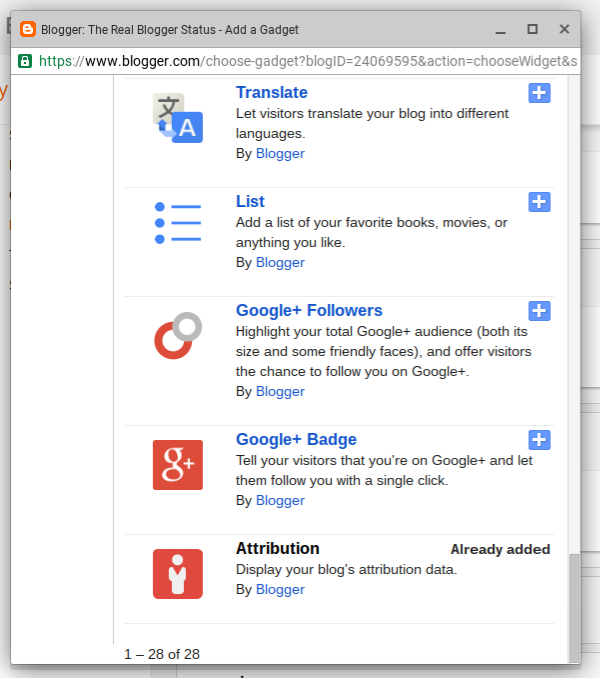
Blogger Magic - Using "Add a Gadget"

One of the most useful features of Blogger is the ability to add many different accessories, to a blog.

There are accessories, for every blog - and for every owner preference. The "Add a Gadget" wizard, in the Blogger dashboard, is the best procedure for adding accessories, to customise a blog reliably.

Using "Add a Gadget" is a simple process. It will be most useful, in the long term, if used cautiously, however.

Adding a gadget is not difficult.


Start from the Blogger dashboard Layout page.


Click on any link to "Add a Gadget", to that template section.

This link, for instance, will add a gadget to the right sidebar.


Choose any of dozens of interesting and useful accessories.


Be knowledgeable, when adding accessories.

Similar to the process of adding an HTML gadget, there are a few mistakes that you can avoid, when adding a gadget in general.

  1. Some sections of the Layout page may not allow gadgets to be added.
  2. When you find an interesting gadget, be selective!
  3. Some Blogger provided gadgets are found under "More Gadgets".
  4. Don't use "Add your own" - unless you know what you're doing!
  5. Add a new gadget, when adding important features.
  6. A gadget, as added, will be displayed on every page of the blog.

Some sections of the Layout page may not allow gadgets to be added.

Each template section can be subject to gadget limits, and to locking. This will prevent addition, removal, and / or re positioning of gadgets.

If you're unable to add, remove, or reposition a gadget, you may have to edit the template - and change the section settings.

When you find an interesting gadget, be selective!

"Add Gadget" lists gadgets produced by third party developers, as well as by Blogger Engineering. Some non Blogger produced gadgets won't benefit your blog, in the long term.


Look for "By Blogger", for the best choices.


Not all third party gadgets are intentionally malicious - but the most reliable gadgets will be explicitly labeled "By Blogger".

Some Blogger provided gadgets are found under "More Gadgets".

The "Basics" tab in "Add a Gadget" contains mostly gadgets "By Blogger" - and most gadgets "By Blogger" are found in "Basics". Some gadgets "By Blogger" are in "More Gadgets" - and you may have to search that list, carefully, to find what you need.

Don't use "Add your own" - unless you know what you're doing!

There are 3 tabs, in "Add a Gadget".
  1. Basics.
  2. More Gadgets.
  3. Add your own.
The latter, "Add your own", can lead to frustration.

If you are not familiar with coding XML gadgets (and probably do not need this advice), don't bother with "Add your own". Stick with "Basics" and "More Gadgets".

Add a new gadget, when adding important features.

You can install HTML code using the Template Editor - or you can add an HTML snippet into an existing HTML gadget - if you wish. I highly recommend that you add a new HTML gadget, for each important accessory, though.

A gadget, as added, will be displayed on every page of the blog.

By default, a gadget, once added, will be visible on every template page. You can, with some care and effort, make specific gadgets display selectively.

Enjoy adding accessories, properly.

So enjoy accessorising your blog - just accessorise carefully.


You can add any number of useful accessories, to a #Blogger blog, using the "Add a Gadget" wizard in the dashboard Layout page. The best choices are explicitly labeled "By Blogger".

Saturday, May 21, 2016

Not All Plugins And Third Party Code Support SSL

With Blogger now providing (optional) HTTPS, on all blogs, we're seeing a few anxious reports in Blogger Help Forum: Get Help with an Issue.
I'm getting an error, on one of my plugins.
This content is not yet available over encrypted connections.
What can I do?
The answer won't be encouraging.
Don't enable "HTTPS Redirect", on your blog.

Not enabling "HTTPS Redirect" won't mean that every plugin or service will work - if your readers choose to use SSL, to access your blog, unfortunately.

One of the reasons why it is taking Blogger so long to get SSL working, is that they have to allow for our blogs, using non Blogger code.

Too many Blogger blogs use non Blogger code that does not support SSL.

One of the reasons, why all websites don't have HTTPS yet, is they have to wait for other websites to provide it.

Rex Swain does not plan to upgrade - ever.


It's similar to the game of Pickup Sticks. You can't (shouldn't) upgrade your blog, until your accessories and plugins support SSL.

I use the Rex Swain HTTP (yes "HTTP:"!) trace, for diagnostics, frequently. HTTPS is not a zero cost upgrade!

Note re HTTPS: I often get requests to provide support for HTTPS. But I'm afraid I have no financial incentive to enhance the viewer. Despite thousands of hits a day, virtually nobody clicks on ads. So, I have this request on my to-do list, but frankly I doubt I'll ever get to it.

Somebody else may depend upon content from your blog - and his website can't be upgraded, because his website displays a Mixed Content alert ("Not secure"), because of his link to your blog. And a third website must wait, for him to upgrade his website.

Your blog may use a plugin that does not provide SSL access.

For plugins that don't support SSL, you may have to choose between having a broken plugin - or dropping use of those services, until they, too, can upgrade. Or don't force HTTPS.

Don't enable the "HTTPS Redirect" option, if you use plugins in your blog, that don't support SSL.


Be patient - and work on blog content.


Be patient. Encourage the websites, that you depend upon, to enable SSL on their service - then you can do the same, with your blog. And keep publishing your blog.

Encourage Blogger to restore the "HTTPS Availability" option. Make SSL access optional, for each blog - not forced SSL optional.


With #Blogger having enabled HTTPS on all BlogSpot published blogs, blog owners are seeing problems caused by non Google websites that don't offer SSL yet. The "HTTPS Redirect" option really should be "HTTPS Availability", again.

https://productforums.google.com/forum/#!category-topic/blogger/2HV3zzclGCg

https://productforums.google.com/forum/#!category-topic/blogger/9rp4vZhBAhQ

https://productforums.google.com/forum/#!category-topic/blogger/p3DlfKBszTM

https://productforums.google.com/forum/#!category-topic/blogger/QMFbAsOvvdc

Monday, April 4, 2016

Blogger Magic - Add An HTML Gadget

Many popular accessories start with raw HTML / JavaScript code, from different third party services.

One of the advantages of publishing a Blogger blog is the abundance of available accessories. With Blogger being in the top 3 of Internet publishing platforms, every third party service wants customers who publish using Blogger.

There are plenty of abusive or malicious accessories, that should not be installed, even when offered - and there are ways to best install the accessories, that can be safely installed.

Most accessories, from third party services, will be provided as HTML / JavaScript.

To add HTML / JavaScript code, to a blog, you can use any of several techniques - though using a new HTML / JavaScript gadget is the smartest choice. Adding an HTML gadget, to a Blogger blog, is not difficult.

Add an HTML / JavaScript gadget, using "Add a Gadget" in Layout.

  1. Start from the "Layout" dashboard menu page.
  2. Click "Add a Gadget".
  3. Click the "+" button, for "HTML/JavaScript".
  4. Paste the code, given to you, into the "Content" box.
  5. Click "Show HTML/JavaScript", if the option is provided.
  6. Click "Save".
  7. Position the new gadget anywhere in the Layout display.
  8. Click on "Save arrangement".

Start from the dashboard Layout page, and select any convenient link to "Add a Gadget". Select "HTML/JavaScript" from the "Basics" tab, in the "Add a Gadget" wizard.


Select "HTML/JavaScript" in "Basics".


Paste the code, that you have to add, into the "Content" window, in the "Configure HTML/JavaScript" wizard. And if you wish, give your new gadget a Title.


Paste the code that you have, into "Content" - with the wizard in HTML mode ("Rich Text" displayed).


And select "Show HTML/JavaScript", if provided for this template - then click on "Save". Finally, click on "Save arrangement".

Avoid several well known mistakes, when adding gadgets.

There are mistakes, that you can avoid - if you know what to do.

  • Be selective, when adding third party code.
  • Add a gadget, using "Basics".
  • Edit an HTML gadget, with "Rich Text" displayed as the caption (for HTML) - or with "Edit html" displayed as the caption (for Rich Text).
  • With a dynamic template, attach or embed the content in a static page.
  • With a mobile display, enable the gadget, if you want it to be viewed.
  • With templates that have a disappearing sidebar, position the gadget in the footer.
  • If "Show HTML/JavaScript" is provided for this template, select that option.

Be selective, when adding third party code.

It's your blog - and you are allowed to install any accessories and tweaks that interest you. For long term stability and success, though, you should try to only install code from reliable sources.

Your readers will be happier, with your blog using reliable accessories.

Add a gadget, using "Basics".

You'll start with an "Add a Gadget" link, on the dashboard Layout page - and the "Add a Gadget" wizard.

The "Add a Gadget" wizard has the "Basics" tab, with the "HTML / JavaScript" gadget in the list - and it has the "Add your own" tab. You should find the "HTML / JavaScript" gadget, in "Basics".

Edit an HTML gadget, with "Rich Text" / "Edit html" displayed as the caption.

The "HTML" / "Text" gadgets, intriguingly have the "Edit Html" / "Rich Text" tabs.

If you want to add / edit HTML or JavaScript, the caption should read "Rich Text".


The HTML gadget, in HTML mode.


Conversely, if you want to add / edit text, the caption should read "Edit html".

It's your choice. The "HTML / JavaScript" and "Text" gadgets are the same - just the captions ("Edit html" and "Rich Text") differ.

With a dynamic template, attach or embed the content in a static page.

Adding gadgets to dynamic templates is not a straightforward process. Gadgets have to be written specifically to support dynamic templates - and the HTML gadget is not written for this.

If you want an HTML gadget to work in a dynamic template, you'll need to attach or embed the gadget, in a static page.

With a mobile display, enable the gadget, if you want it to be viewed.

By default, the "HTML / JavaScript" gadget does not display, on a mobile browser. You will have to use the Template Editor, and enable the gadget to display, in mobile mode.

With templates that have a disappearing sidebar, position the gadget in the footer.

Some Responsive class templates have a sidebar that is hidden by default. To see the sidebar, you click on the "hamburger" icon in the header.

If you want your new gadget to work with the blog loaded - even without the sidebar showing - you need the gadget in a visible section. The footer is a better choice, in this case.

If "Show HTML/JavaScript" is provided for this template, select that option.

If the option to "Show HTML/JavaScript" is provided in the "Configure HTML/JavaScript" wizard, be sure to select that - if you want the gadget to operate, with the blog loaded. If the gadget should not be visible to the reader, but it needs to operate, you still must enable this option.

It's your blog.

There are ways to make an HTML gadget work, while ignoring the above advice. Long term success will be much more likely, though, with attention to the details.


One of the most common accessories, added to a #Blogger blog, starts with an HTML / JavaScript gadget. This is a very versatile gadget - and it's not difficult to install. There are several common sense details, however.

Monday, December 15, 2014

Don't Try To Number Dynamic Pages

One interesting question, which we see occasionally in Blogger Help Forum: Learn More About Blogger, would be about making the blog easier to read - if the blog were static.
How do I number the pages, in the blog?
This blog owner does not quite understand the concept of dynamic content.

With a static website, and each page linked linearly, one after the other, it might make sense to number the pages.

Blogger blog content is dynamic.

A Blogger blog has dynamic content. Each reader retrieves the posts, in reverse date sequence, in a number of contexts.

  • In main page view, one page linked to the next - owner selectable maximum posts / page, auto paginated.
  • In individual post view, one post linked to the next - one post / page.
  • In an archive retrieval, one page linked to the next - a maximum of 20 posts / page, auto paginated.
  • In a label search, one page linked to the next - a maximum of 20 posts / page, auto paginated.

Each label in the blog can generate a different label search, one search / label.

We say that the content is dynamic, because each of the above contexts use blog content, retrieved just when a reader clicks on a link.

Each time content is retrieved, for each reader, it will differ.

Each different retrieval will generate a series of physical pages of display, with a different combination of posts. Each retrieval will be paginated according to amount of content, by auto pagination.

If the posts are summarised using Jump Break, pagination will reflect the visible post content. With other "Read More" solutions, this may or may not be the case.

Dynamic indexes can use any combination of various dynamic accessories.

You can index the posts in a blog, using various dynamic sidebar gadgets.

  • An archive index.
  • A label index.
  • Any number of linklists.
  • Any number of feed gadgets.

Again, each index will be dynamic.For truly dynamic indexing, you can provide a single blog search - or a multiple blog search - or even a label combination search.

You can get installable gadgets, and custom templates, from various third party developers. Some gadgets and templates will let you setup an index (whether dynamic, or static), with page numbers. This will be third party code - and carries with it the risks of using third party code.

Non dynamic accessories require post template tweaks.

Non dynamic indexes generally install as code, inserted into the post template. The post template is not a blog component that should be tweaked, without understanding the risks.

Also, if you apply to host AdSense ads on the blog, you'll probably get a refusal, cited as "Difficult navigation". The AdSense crawler can't navigate JavaScript based links - and won't be able to analyse post content, to place ads.


The AdSense crawler can't navigate this blog, with numbered pages.


All of the above details affect how much content may appear on one physical page, and how many pages may be relevant to the retrieval. With these unknowns, it is not productive to identify each post - or set of posts - using page numbers.

How many index listings would you want to keep - especially considering that any one index could change, in the next minute, as a new post is published, or maybe a label is added to, or removed from, one or more posts?

Blogger content is dynamic. Treat it, dynamically.

Monday, December 8, 2014

Use Common Sense, And Protect Your Blog

We see various questions about getting advice and non standard accessories / code, from blogs and websites advertised outside Blogger / Google control - generally in Blogger Help Forum: Get Help with an Issue.
Why can't I see my blog? Every time I click on "View blog", I get a face full of ads!
and
Where can I get accessories, gadgets, and templates for my blog??
and
How do I know what accessories, gadgets, and templates are safe, for my blog?
and
Why did Blogger lock my blog, as a malware host?
All of these folks are discussing the same issue - blog content security. Some are asking properly, before they cause their problems - but others are not.

We have several known bad actors, right now - who have been putting out various blog accessories which, initially, work fine.

After thousands of victims have installed some accessories on their blogs, the owners and readers observe that the blogs are suddenly redirecting to advertising pages, or throwing popup ads on top of blog content. The latency period, for some blogs which are the first to install a new hacker provided gadget, may be as long as 6 months to a year.

By the time any malicious gadgets are discovered, identified, and removed, the victims have to deal with unhappy readers, who don't enjoy seeing a screen full of ads, instead of their favourite blog to read.

Search engine reputation is also affected by this problem. In some cases, the malicious gadgets may be detected by Blogger - and the host blog (ie, your blog) is locked, as a suspected malware host. Even if Blogger does not detect a problem, services outside Blogger will trash your blog.

Thoughtful blog owners will ask how they can get good, reliable, and safe blog accessories. I would start, by ranking the possibilities.
  1. Blogger "Add a Gadget", with gadgets labeled "By Blogger".
  2. Websites provided by well known Internet services.
  3. Blogger "Add a Gadget", with gadgets not labeled "By Blogger".
  4. Non Blogger websites provided by developers.
  5. Non Blogger websites provided by hackers and spammers.


1. Blogger "Add a Gadget", and gadgets labeled "By Blogger".

The most reliable and safe gadgets will always be found in the "Add a Gadget" library, and be labeled "By Blogger". You have to trust Blogger, if you are going to use their publishing platform in general.

The optional gadget library, and gadgets "By Blogger", is just as safe as the dashboard, and components referenced by the dashboard.

2. Websites maintained by well known Internet services.

Most well known Internet services and social networking platforms will provide gadgets that are designed for Blogger. The best gadgets will be labeled "For Blogger", and be written in Blogger compatible XML. Some general purpose gadgets, written in HTML / JavaScript, will also be suitable.

Almost any gadget in this category, if written by the staff of the service in question, will be free from malicious intent. Both FaceBook, and Twitter, for instance, provide gadget libraries. Because these gadgets were not written by Blogger staff, they will not be as reliable as Category #1.

3. Blogger "Add a Gadget", and gadgets not labeled "By Blogger".

Many gadgets provided in "Add a Gadget" will be provided by third party developers. Hopefully, Blogger / Google exercises some quality control, over gadgets distributed through their library.

That said, the first mass hacking of Blogger blogs, of 2009 - 2010, came through gadgets that were distributed from the "Add a Gadget" libraries. One such gadget was discovered, just last week.

Not all third party accessories are provided with malicious intent. Unfortunately, even if not provided maliciously, some accessories may be unreliable because of periodic changes by Blogger.

4. Non Blogger websites provided by developers.

After the unforgettable blog hijacks of 2009 / 2010, then 2010 / 2011, Blogger / Google Security got aggressive with the problems of malicious gadgets being served from their libraries. Most recent hacking attacks have been distributed from websites outside the control of Blogger / Google.

Some non Google websites are provided by third party developers, who write code almost as reliable as Blogger staff. However, if the choice for my blog was between gadgets in Categories #3 and #4, and be of equal functionality and suitability, I would choose #3 over #4 - and I would seriously recommend the same, if asked.

In some cases, legitimate third party developers have provided accessories that require access to their code libraries. The developers have gone out of business, and have cancelled the domains where the code libraries were served. The abandoned domains have been bought by spammers, as investments - based on serving ads to accumulated incoming traffic, from people surfing to the blogs and websites which have the accessories installed.

In some cases, the domains were actually abandoned by the developers. In other cases, the developers were spammers, who sold their domains for a good profit, to other spammers.

We, the blog owners, cannot really tell which case is involved, when our blogs start redirecting to pages of spam - or even malicious domains, serving malware to our readers. We do need to protect our readers, though.

5. Non Blogger websites provided by hackers and spammers.

Some websites outside the control of Blogger / Google should not be trusted. I would seriously suggest without hesitating, that you stay away from websites like "SEOYourBlog.com", "MakeMunyFromHome.info", and such.

Any blog or website, with clever initials in the name, should be considered, with great caution. Although "SEO" was originally a serious concept, most websites with "SEO" in the name will not have your best interests in mind. Likewise "GPT, "PTC", "PTS" will do you no good.

If and when you add gadgets, always add them using a new HTML / JavaScript gadget. Gadgets added using "Add a Gadget" can be easily removed, if they go bad. Gadgets added using "Edit HTML" must be removed using "Edit HTML" - and some gadgets will be extremely challenging to diagnose and remove.

Security begins with you.

Monday, September 15, 2014

Third Party Email Collection / Login Gadgets Being Detected As Malware / Phishing

Recently, we've had several reports from naive blog owners, with blogs locked for malware or phishing, in Blogger Help Forum: Something Is Broken.

Some owners have found accessories, such as email address collection or even a convenient login gadget, offered by helpful third parties. Installing the new gadgets, they have later received the well known (automated detection) notice, from Blogger Support.

Both third party email collection, and convenient login gadgets, are righteously classified as malware.
  • Email address collection, run through a third party database, can provide hackers a starting point for account and blog theft, using botnets - or the account holder may be added to email distribution lists for spammers.
  • Third party login gadgets are blatant phishing tools - and can be used for immediate account and blog theft.
Neither accessories are good, for your readers.

Any such third party accessories are just hacking / phishing tools. When you install this on your blog, it becomes hacking / phishing enabled by you.

You can collect email addresses, if you wish - using a FeedBurner Email Distribution gadget, which allows your readers to subscribe to a feed from your blog. If you want to offer your readers a convenient Blogger / Google login, add an HTML gadget, targeting
http://www.blogger.com
and let them use the standard Google "One account" login screen.

Don't be a dupe for the hackers, phishers, and spammers - keep your blog clean, and keep your blog online. The future of your blog, and your readers well being, requires your wise decisions.

>> Top

Saturday, April 7, 2012

Problems With Non Google Hosted Photos Are Separate From Problems With Picasa Hosted Photos

We see daily evidence of confusion, in Blogger Help Forum: Something Is Broken, about photo hosting.
How much space do I get for photo storage?
and
What happened to the pictures on my blog?
and
Why does my blog look weird now?
Some of these questions come from photos (pictures) hosted by Google, others from photos (pictures) hosted outside Google - and the uncertainty about hosting leads to confusion about the problems.

We've been exploring various issues with Picasa, aka Google photo hosting, recently.
  • Identifying Picasa problems.
  • Interference involved in setting up other Google services.
  • Loss of Picasa accounts.
  • Storage limitations involved in Picasa hosting.
Similar issues exist with photo hosting outside Google - and blaming Google for problems which they don't cause (except, as they provide a service like Blogger, which permits use of non Google services) is not a productive use of anybody's time. Non Google services like Flickr, ImageShack, and PhotoBucket each have their own limitations and policies.

One interesting problem with photo storage, seen occasionally, comes from third party template providers and hosting of background images used in the templates. Loss of a background image, even if it does not result in multiple views of the infamous ImageShack Frog when bandwidth limits are exceeded, can cause problems with blog layout.

There are advantages, and disadvantages, of using Google and non Google photo storage. If you publish a Blogger blog, you're entitled to use any choice which pleases you - but you, as the blog owner, need to be aware of the choices, and possible consequences.

>> Top

Sunday, March 11, 2012

Problems With FaceBook Code Are The Responsibility Of FaceBook Support

As we add social networking accessories and gadgets to our blogs, we need to appreciate the nature of the connections, which we are adding.

Some Blogger blog owners fail to understand the relationships between the different Internet services, such as Blogger / Google, FaceBook, and Twitter.
Why do I have to solve a CAPTCHA when I post on my Wall?
and
Why does my "Share to FaceBook" wizard not let me include a snippet or thumbnail from my blog?
These are typical questions, seen recently in Blogger Help Forum: Something Is Broken. The people, asking these questions, probably do not understand that services like FaceBook are not part of Blogger or of Google.

We have been combining our Blogger blogs, and our Blogger blogs and our non Blogger web sites, for a while.

Similarly, we can combine our Blogger blog posts with our FaceBook Wall, and with our Twitter Stream. As we combine these various Google and non Google services, we need to observe the support responsibilities for these services.

The "Share to FaceBook" button, added to our blog, contains code written by FaceBook staff - and problems with the "Share to FaceBook" wizard are, generally, the responsibility of FaceBook.

Blogger / Google wants to prevent bogus and malicious Blogger blog content, and FaceBook wants to prevent bogus / malicious FaceBook Wall content. Anything that you attempt to post in FaceBook - including links to, or photos or snippets from, your Blogger blog - is subject to FaceBook security decisions. If FaceBook wants you to solve a CAPTCHA when you post, or simply blocks you from posting, that is their decision.

Blogger / Google gives some us tools from FaceBook and Twitter. Other tools are provided by third parties. We may use any tools provided, as part of our blogs - but our use of these tools is subject to actions of the people who create them.

Report a FaceBook Problem
To report a problem with FaceBook, you start from the "Gear" icon at the top right of any FaceBook display. Select "Help", "Report a Problem", and "Report a Problem" again. That gives you the "Report a Problem" wizard. This procedure, too, may change as FaceBook changes their website.

>> Top

Tuesday, February 14, 2012

Your Blog Is Forever - But Requires Your Effort

Some blog owners misunderstand the apocryphal promise from Blogger to us
Blogger accounts and Blog*Spot addresses do not expire.
From the tone of some questions in Blogger Help Forum: Something Is Broken, some blog owners seem to think that Blogger promises us unending service, without requiring any effort on our part.

We need to think of Blogger blogging as a partnership, between Blogger and us. Blogger is a business - and some principles of business apply to how they treat us.

In our constant stream of demand for features and service, as owners and readers of Blogger blogs, we need to remember that Blogger (and Google) are a business. Various principles of business will occasionally apply, in their policies. These policies may not, necessarily, be responsive to our immediate and personal needs - though they may support the overall needs of Blogger, in general.
  • Due diligence. Some Blogger policies may be necessary to support the Blogger customer community, in general.
  • Due process of law. Some Blogger policies may be necessary to support the rights of other individual Blogger customers.
  • Return on investment. Some Blogger policies may be necessary to support Blogger as a business.
  • Personal Responsibility. Some Blogger policies may be necessary to allow us to maintain our Blogger blogs, and personal computers, to support our personal needs.

Due diligence. Blogger may make some decisions in order to protect themselves, and their customers, in general. Blogger may refuse to disclose personal information about us, if we cannot prove our identity. Even if we cannot accept, or understand this policy, Blogger may maintain this policy to better support the Blogger community, in general.

Due process of law. Blogger may refuse to respond to our personal demands, to protect the rights of other Blogger blog owners. They may not delete blogs which we don't own, purely because we complain that the content of some blogs may say bad things about us.

Return on investment. Blogger may refuse to support us, when we have not made any similar effort to assist them to support us. If we require service, that requires much effort from them, and provides no benefit to the Blogger owner community in general, we may not get support immediately - or at all.

If we ignore our Blogger accounts and blogs, for many years, our accounts and blogs will be there waiting for us. Our access to our accounts and blogs may be restricted, however - and Blogger Support may not fulfill our personal needs.

If we ignore their warnings about coming changes, we may not be supported after such changes are finally implemented.

Personal Responsibility. Blogger cannot support our blogs, and our use of our personally owned computers, when our personal decisions compete with their policies. Our use of different browsers, varying local security policies, and of different non Blogger products in our blogs, require us to take personal responsibility.

As owners and readers of Blogger blogs, as of similar Internet services, we have to take ownership of our personal decisions, similar to many Blogger policies. We cannot demand more of Blogger, than we do of ourselves.


http://blogging.nitecruzr.net/2012/02/your-blog-is-forever-but-access-to-and.html
Your Blog Is Forever - But Access To, And Support Of, Your Blog, Requires Your Effort
Your Blog Is Forever - But Requires Your Effort

Wednesday, January 25, 2012

Identifying And Removing Deviously Engineered And Marketed Blog Hijacks

We saw the symptoms of the first carefully engineered blog hijacks, in Blogger Help Forum: Something Is Broken, two years ago. During each succeeding holiday season, each attack has apparently become more and more deviously engineered.

This season - each season starting in Fall of one year and lasting until Spring of the following year - we are seeing a hijack complement which appears to be devious in both marketing and installation technique, and which requires a complex search of the affected blogs. If you are receiving reports from your readers
Your blog starts to load - but is quickly replaced by a page full of advertisements!
you may need to exhaustively examine your blog for any third party code - and as always, the problem code may have been installed at any time in the past. When discovered, the hijacks are not consistently found in recently installed code.

The blog hijacks, being examined during this holiday season - appear to be deviously planned and marketed.
  • The hijacks use a variety of host accessories and gadgets.
  • The hijacks use a variety of distribution libraries.
  • The hijacks are being marketed to a diverse audience, which causes different installation techniques - and necessitates the complex search of affected blogs.

To find and remove a hijack from an affected blog, you'll need to start by viewing the blog in question, using a text only browser, or proxy service. I, personally, use several products.
  • hpHosts vURL is a text only browser, that runs as a stand alone application locally on your computer.
  • Notepad-Plus-Plus is an offline text editor, which provides a variety of search tools for text files. You can sometimes avoid use of your browser completely, by copying page source code directly from vURL.
  • Rex Swain's HTTP Viewer is a standard online text proxy that I use.
  • Lingo4you HTTP Web-Sniffer is an online alternative to Rex Swain.
All of these products may be more or less useful in identifying the source of your specific hijack. The Rex Swain and Web-Sniffer text proxies each have their effective differences.

If anybody uses alternative products, and cares to share information about the tools used, I will most gratefully add them to my library here.

The approach here is complex.
  1. Of course, backup the template, before starting.
  2. Load the blog, in question, in the text browser / proxy display of your choice.
  3. Do a simple text search for the identified host / target name in the URL, such as "adiwidget", "pagesinxt", or "ripway".
  4. You'll see several different possibilities.
    • The search may reveal the hijacking code in an HTML gadget. You can use the "Pages Elements" / Design tab (Classic GUI), or the "Layout" wizard (New GUI), and remove the offending gadget.
    • The search may reveal the hijacking code in the template HTML. You'll have to use the Template Editor, and remove the offending lines of code.
    • The search may not find any identified host name, in a text search. You'll have to do an extensive text search, looking for unknown HTML / JavaScript gadgets / snippets of code, and evaluate each gadget / snippet, on the fly.
  5. You may need to bypass the Blogger menu structure, to directly access the Blogger wizard needed, if trying to use the Blogger menus is also a problem.
  6. Clear browser cache, before checking for success.
  7. And always backup the template, again, after completing this task.

And hopefully, having found and removed a hijack from your blog, you will learn to be more discrete, in your choice of accessories and gadgets, in the future.

Wednesday, January 11, 2012

Publishing Your Blogger Blog Post To FaceBook Fails, With Open Refusal By FaceBook

Late last year, Blogger blog owners seeking to publicise their blog posts using their FaceBook Wall, were denied that possibility, silently. That problem was recently resolved, though still in silence.

Recently, Blogger blog owners started reporting a new symptom of problems with FaceBook.
I try to share my blog address on FaceBook, and I receive this message
The content you're trying to share includes a link that's been blocked for being spammy or unsafe:
Now what do I do?
This symptom is most likely a problem which the individual blog owners will need to discuss, with FaceBook Support.

Each Internet service has the right, and the responsibility, to block and interfere with spammy or unsafe content, on its service - to protect the legitimate users of its service.

Blogger has been blocking and interfering with spammy and unsafe content for several years - not always well received, but they are doing their best. FaceBook has the same right, and the same responsibility.

This problem appears to involve blog posts that contain pictures hosted on "2.bp.blogspot.com". I'll note that I posted, yesterday, a FaceBook Wall post referencing a Blogger blog post which contains a picture hosted on "4.bp.blogspot.com", with no problem. You can find my test post on my Wall - but you'll have to hunt for it on my FaceBook Wall, since I have not yet learned the technique to extracting and sharing, FaceBook Wall posts, outside FaceBook.

If you, a Blogger blog owner, believe that this is an unjust decision, you need to complain to FaceBook Support. FaceBook Support issues, like Blogger Support issues, are best solved with collaboration. You, and millions of other Blogger blog owners, seeking to publicise your blogs on your FaceBook Wall, can change this recent decision by FaceBook - if and only if everybody affected complains.

But you must complain to FaceBook Support. Not Blogger Support.

>> Top

Friday, December 30, 2011

Blogger Blogs Redirecting To "pagesinxt.com" / "ripway.com"

In spite of my recently published caution against gratuitous additions of third party blog accessories, we're seeing a small yet steady stream of reports about mysterious blog hijackings, in Blogger Help Forum: Something Is Broken.
When I view my blog, it shows up for a few seconds - and then forwards to this weird website, that I've never heard of.
Not everybody is aware of the dangers of adding non Google developed code, to their blogs.

Unlike the blog hijacks from the past couple years, the "pagesinxt" / "ripway" hijacks being reported have no consistent diagnosis.
  • We have not yet observed a consistent host feature, such as "falling snow" (from 2010).
  • Some hijacking code, when found, is part of the template HTML.
  • Other hijacks are apparently being installed as HTML / JavaScript gadgets.

To find this latest hijack, you'll need to start by viewing the blog in question, using a text only browser, or proxy service. I, personally, use several products.All of these products may be more or less useful in identifying the source of your specific hijack.

The approach here is multi-phasic.
  1. Of course, backup the template, before starting.
  2. Load the blog, in question, in the browser of your choice.
  3. Do a simple text search for "pagesinxt" and for "ripway".
  4. You'll see several different possibilities.
    • The search may reveal the hijacking code in an HTML gadget. You can use the "Pages Elements" / Design tab (Classic GUI), or the "Layout" wizard (New GUI), and remove the offending gadget.
    • The search may reveal the hijacking code in the template HTML. You'll have to use the Template Editor, and remove the offending lines of code.
    • The search may not find either "pagesinxt" or "ripway". You'll have to do an extensive text search, for unknown HTML / JavaScript gadgets, and evaluate each gadget, on the fly.
  5. You may need to bypass the Blogger menu structure, to directly access the Blogger wizard needed, if trying to use the Blogger menus is also a problem.
  6. Clear browser cache, before checking for success.
  7. And always backup the template, again, after completing this task.

If you want more detailed help for identifying or removing your personal hijack, please start a new discussion, in Blogger Help Forum: Something Is Broken, state the URL of your blog, and state what URL the blog is redirecting.

>> Top

Friday, November 18, 2011

It's The Holiday Season Again, And It's Time To Decorate Our Blogs

The Winter Holiday season is approaching, and this week we're seeing queries by some blog owners, getting ready.
Why do my readers see a search display - instead of my blog?
and
How do I make it snow on my blog?
and a few owners, and visitors
Why does my browser freeze or lag when viewing this blog?
Many blog owners, who publish craft, family, and personal themed blogs, just have to make their blogs reflect their holiday wishes for their readers. Only later, they may re think their decision.

Some of us in Blogger Help Forum: Something Is Broken remember this season last year, though not fondly. Many blog owners, having previously decorated their blogs with Falling Leaves (Thanksgiving), Falling Snow (Christmas), and later Falling Hearts (Valentines Day), found themselves spending time in the forum, asking why nobody could see their blogs. The answer that they found was that their blogs, previously decorated with the Falling Leaves / Snow / Hearts animations, were redirecting their readers to websites which were not relevant to their readers interests or needs.

The owners of computers poorly protected against malicious software installation, when redirected from their friends holiday decorated blogs to the hijackers websites, found themselves later consulting their local computer guru. The gurus spent time (not always without expense) removing some unwanted software, installed by the hijackers websites.

The charming thing about the hijacks is that the Falling Leaves / Snow / Hearts gadgets, when installed, did not immediately redirect the various visitors to the malicious websites. This detail appeared to indicate very devious planning by the hijackers, who had waited, patiently, while thousands of blog owners had installed their trickery, before activating the hijack.

This caused some confusion in the forums. A normal part of problem diagnosis - which many of those of you, who have requested help here, may recognise - is the brief and very simple question
What changes have you made to the blog, recently?
Most blog owners, naturally, answered
Nothing interesting.
Later, when a malicious Falling Leaves / Snow / Heart accessory was identified, with the stern advice
Get rid of that!
The answer would be
I installed that 6 months ago! Surely, that's not the problem??!!

Only after large numbers of people had reported problems with their blogs, and we found the Falling Leaves / Snow / Heart accessory on the problem blogs, did we advise everybody
Remove all Falling Leaves / Snow / Heart accessories, from your blogs, immediately.

Besides the blatant blog hijack threat, there's another issue for you to consider. The animation - falling hearts / leaves / snow - requires intense processor activity. If people stop visiting your blog, because their browsers freeze up, you'll need to revisit your decorative decision.

So, as this years holiday season starts, we'll advise everybody to beware of any animated accessory, such as (but not limited to) Falling Leaves / Snow / Hearts. Install any third party accessory with care and discrimination. And remember everything installed, for a long time afterwards.

>> Top

Tuesday, October 11, 2011

Blogger Magic - Third Party Visitor Logs / Meters, And Referer Spam

Blogger blog owners have been suffering from the onslaught of referer spam, in their Stats logs, for over 6 months now. Some blog owners, who use third party visitor logs / meters like FlagCounter, Sitemeter, and StatCounter, have started to wonder.
How do SiteMeter and StatCounter manage to filter out the referer spam, yet Google cannot do anything about it?
This would be quite a magic trick indeed - if this was happening.

When you setup a third party visitor information product, like FlagCounter, Sitemeter, and StatCounter, the installation process involves addition of a JavaScript code snippet, as part of the blog template. Any time a page in the blog is loaded, by a blog visitor, the JavaScript code references the FlagCounter, Sitemeter, or StatCounter server, and adds a visitor record describing the pageview.

That's such a simple way to gather information about your visitors - and for its simplicity, it is unreliable, in various ways.
  • Your visitors who use computers that filter content from domains - like BlogSpot, FlagCounter, Sitemeter, StatCounter, or possibly your non BlogSpot custom domain - won't be counted, reliably.
  • Your visitors who share a caching proxy server won't be counted.
  • Depending upon where in the page, the JavaScript code is added, your visitors may or may not be counted.

When Blogger / Google designed the Stats visitor information accessory, they used another technique for counting visitor activity. Blogger, unlike FlagCounter, Sitemeter, and StatCounter, has access to the server activity logs. When Stats was activated, for the Blogger blogosphere, they activated it on a blog by blog basis - and without requiring any updates to the blog code.

Every Blogger blog was given Stats access, and the statistics initially provided preceded actual Stats availability, because nobody had to install any accessory code to the blogs. That is because Blogger uses the actual server activity logs - and does not require add-on accessory code.

Unfortunately, server activity logs only record server activity - and this is how referer spam works - and why it is so hard for Google to block it. Referer spam is simply a normal access request from the spammer, which generates a server access record, and a Stats pageview. The spammer simply goes away after generating the initial access request. The Blogger server, as with any non Blogger server, has no way to detect when the spammer drops the connection and goes away.

Since third party products like FlagCounter, Sitemeter, and StatCounter use add-on code, they are not susceptible to referer spam techniques. Only products which work from the server activity logs are susceptible. FlagCounter, Sitemeter, and StatCounter, and other third party visitor information accessories, have no need to filter bogus activity.

And this is why I have stated that the only way that referer spam will ever go away is for us to make it unprofitable for the spammers, by not clicking on the links in the Stats logs.

>> Top

Saturday, March 27, 2010

Blogger Blogs Redirecting To "freegadget2015.blogspot.com" / "freegadget-xde"

As yet another chapter in the tale of the hijacked Blogger blogs, today we have reports of blogs redirecting to "freegadget2015.blogspot.com" and "freegadget-xde".

For those newly experiencing this persistent assault upon our blogs, see the FAQ My Blog Has Been Hijacked - What Do I Do? for diagnosis and removal techniques. Note that you'll probably need to use the "Edit HTML" wizard, and delete the offending code, for expedient removal.

>> Top

Wednesday, March 24, 2010

Blog Hijackings - The Worst May Be Over

Blogger Support took control of the blog hijacking problem yesterday. Today, I did a search in "Add a Gadget", and found encouraging results.


I believe that they are now trying to disable the installed gadgets - so if you see a blank space on your blog, that's possibly why.


(Update 2010/11/25): And to celebrate Thanksgiving Day 2010, we see a report of yet another hijack attempt.

>> Top

Monday, March 22, 2010

Blogger Blogs Redirecting To "freegadget2014.blogspot.com"

In a disturbing repeat of problems experienced earlier this month, we have reports of blogs redirecting again, this time to "freegadget2014.blogspot.com".

For those of you experiencing this assault upon your blog, see the FAQ My Blog Has Been Hijacked - What Do I Do? for current diagnosis and removal techniques. Note that the gadgets noted this week, as earlier, appear to resist removal, so you'll probably need to use "Edit HTML", and delete the offending code.


(Update 2010/03/23): Blogger Support has taken ownership of the problem.
Our team is working to sort out these affected gadgets from our side, and hope to have this fix out shortly.


>> Top

Navigate» Become author for this Blog