Everybody who has owned or read a Blogger blog, for more than a week, surely knows about the infamous bX codes - and has probably asked how to fix one.
Some people have fixed one - but immediately, seen another. Others have seen theirs go away, then later discovered that the blog is broken.
Some folks see the errors as major problems, others minor annoyances.it's disheartening to see that the bx error code problems are still existing.
Not everybody realises that the codes are not the problems - they are simply a method to identify the problems. Many Blogger problems cannot be identified easily in language.
Many problems, many "solutions"
There are many known "solutions" for the codes, because there are many different problems, with many different causes. Here, we have 5 examples.- Some codes are caused by an inconsistency in private data. These codes can generally be cleared by "clearing cache, cookies, and sessions".
- Some codes are caused by over enthusiastic template customisation. These codes can be cleared by getting a new template, or restoring the template from backup, for the blogs that are issuing the code.
- Some codes are caused by bogus custom domain addressing, for the blogs that are issuing the code. These codes can be cleared, only, by correcting the DNS addressing, for the blogs that are issuing the code.
- Some codes are caused by trying to use an unsuitable browser. Right now, Blogger does not support Internet Explorer V11 These codes can be cleared only by using a different browser.
- Some codes are caused by dodgy Blogger code. These codes cannot be solved by blog owners or readers. The bX codes, in many cases, are simply from Blogger Engineering adding "break points" into their code, so they can diagnose a known problem.
Above, we see just 5 examples. There is one rule, which you may want to consider, when diagnosing bX codes.There are no rules, in diagnosing bX codes.
That is the plain truth.
History
Before they started issuing bX codes, Blogger would simply issue one universal error, that was incredibly annoying, to everybody seeing it.We apologize for the inconvenience, but we are unable to process your request at this time. Our engineers have been notified of this problem and will work to resolve it.
Replacing that error, with the unique bX codes, was so simple - and elegant. The program, that issues a bX error report, simply takes the address of the failure point in the Blogger code library, where an unacceptable condition has occurred, and hashes the address into a 6 character alphanumeric code. And there is the bX code. Yes, that simple.
Blogger keeps a database listing of bX codes that are currently active, and a running count for each code. When a given code becomes more noticeable than others, an engineer simply uses the 6 character code to locate the failure point in the Blogger code library, and diagnoses the cause of the error. Fixing the code will vary, depending upon the cause of the code.
A hypothetical example
If you add an extra "<div>" tag in your template code, using the Template Editor, it's possible that the Template Editor code may detect it, and specifically advise you.Don't add a "<div>" tag there!
In many cases, through, an extra "<div>" tag won't be noticed until you try to save the changes - or even until a reader views the blog under specific conditions. Either of the latter two cases may result in another bX code.
When you report your bX code in Blogger Help Forum: Get Help with an Issue, if other people have reported that same code, it's possible that we might have a known solution, ready for you.Don't add a "<div>" tag, there!
In many cases, though, you will be advised toRestore the template from backup - or get a new template from the dashbooard Template wizard.
In either case, though, the advice to get a backup or new template is not a solution - it's a workaround. The proper solution is for you to figure out what you did, that was wrong, and correct what you did.
In some cases, if we see enough of the same code, as we do now with the "bX-w7tr63", currently being reported in Blogger Help Forum: Get Help with an Issue - we may advise you.Blogger cannot support you, using Internet Explorer, right now.
Internet Explorer V11 has too many internal changes, for Blogger Engineering to update the Blogger dashboard utilities, and remove all known problems. That may be vaguely similar to the problems where we alternately advise.Restore the template from backup - or get a new template from the dashbooard Template wizard.
In either case, we provide most advice based on feedback from other blog owners.
Reality
Be aware that each bX code may have a different solution. Be wary of advice that simply instructs. Most bX errors are temporary and will usually go away on their own.
You may read [FAQ] What Are The Mysterious bX Codes? and try clearing your cache and cookies.
Some errors may go away, on their own - but most require somebody to take some action. Not all that many are temporary.
Occasionally, someone may publish a blog as private, invite / accept readers, then later decide that results are not as positive as desired.
It's easy enough to change a blog, from Private to Public. Just go to the Permissions wizard, in the dashboard menu Settings - Basic, and change Blog Readers from "Private" to "Public".
Unfortunately, this may not leave everybody able to access the blog.I made my blog public, last week. Some of my friends are now seeingYour current account does not have access to view this page.
Why is this still an issue?
The blog owner, in this case, is seeing the effect of cache, and authentication.
In many cases, simple instructions to "clear cache, cookies, and sessions" may resolve this problem. This does not always work, however - and the mystery why it does not always work may frustrate us, almost as much as the original symptom.
Sometimes, clearing private data - even though it may be a bit drastic - does nothing to resolve the problem at hand.I just did that - and there's no improvement!
Now, we suspect that there is a cache, outside the browser, that can't be cleared.
There is no permanent solution, for upstream cache. But, there may be a diagnostic step, that helps us understand what is going on.
This is the URL of this blog.http://blogging.nitecruzr.net/
If I need to access the main page, without refreshing the browser, or clearing cache, I can retrieve the updated content, on a temporary basis.http://blogging.nitecruzr.net?
A URL containing a "?" is normally used for retrieving a web page, dynamically, with extra settings embedded in the URL.http://blogging.nitecruzr.net?something
A dynamic retrieval is evaluated immediately, using the Blogger server (in this case) - and without any interference from any caches.
Even without a real need to have the URL evaluated by the server, we can still make the URL dynamic, just by adding the "?" at the end. And this bypasses any cache - including cache upstream from the browser.http://blogging.nitecruzr.net?
Just remember - this is a temporary solution.
If you forget to use the "?" later - and you retrieve the old web page, still in cache, don't be surprised to keep seeingYour current account does not have access to view this page.
Until the cached page expires normally, from the cache that you can't control, that's going to still be a possibility.
>> Top
Most of us, as we surf the Internet, are going to surf some websites, repeatedly.
Everybody has favourite websites. When we surf the same website, over and over, some of what we do and see may not change a lot.
To keep us from wasting our time, and generating unnecessary network traffic, our browsers keep track of the websites that we visit over and over, save records of what we do and copies of what we see, and note what has changed. The website content, stored locally, is known as "private" data.
There are times when we need to clear "private" data. Note the different browsers - and the different menus and selections, provided by each browser.
- If you have a problem when viewing your blog - or if you wish to immediately refresh your personal view of your blog, you should clear "cache".
- If you have a problem maintaining or publishing your blog - maybe when switching between Draft and Production Blogger, you should clear "cookies".
- Whenever you clear cookies, you should clear cache, also - so, if you have a problem when maintaining or publishing your blog, you should clear "cache, cookies, and sessions".
There are other reasons for clearing private data - but there are also reasons for not clearing private data, indiscriminately. It will be worth your time, to understand what and when you should clear - and not clear.
Normally, you would not, routinely, clear private data.
What if you use a publicly shared computer - maybe in a coffee shop or library? Or maybe, you carry your computer to a coffee shop or library? Do you want your private details - such as account names, passwords, even a list of what websites you surf - being available for other patrons of the coffee shop or library, after you leave?
Most of us do not want our private details, visible to any curious fellow patron - or maybe to our family either. But not all data is equally as damaging, if revealed to strangers, or to people who know us.
To help us keep our private lives private - yet not waste time or generate unnecessary network traffic, our browsers offer us the opportunity to save some content, and to delete other content - when we know what options are available to us.
Cache is simply locally stored copies of code and static pages, that you and other people, using the computer, might accumulate. Cache contains no sensitive, personally identifying material - other than (again) possibly identifying what websites you have visited.
If you share a computer with another person, identifying what websites you visited, and what websites the other person visited, will require knowing times each of you used the computer. There are no personal identifiers which indicate which of you visited a given website.
Forms contain online entered data, such as account names. Forms are slightly less sensitive than passwords, since they may contain large volumes of random data. Look at the boxes in the Blogger dashboard - those are all forms. Hidden in the forms, you may find an account name - or an email address. It's like asking how dangerous a needle may be, in a stack of hay.
History is a log, describing what websites, and website pages, that you have visited. History might be important if having people, other than you, know that you visit certain websites; other than the personal embarrassment possibility, history is relatively harmless.
Passwords are the most sensitive bit of data, that you can store on your computer. Someone extracting your passwords, on a per website basis, can use your account in each website, to operate as you. An online password is just as sensitive as the password (aka "PIN") that you might enter at an ATM.
Preference cookies (aka "cookies") are local storage of website relevant details. Preference cookies are miscellaneous settings, used to remember choices which you might make, when viewing a given website, repeatedly. Some browsers identify "preference cookies", and "session cookies", collectively, as just "cookies". Firefox, in various places, identifies "preference cookies" as "cookies", and "session cookies" as "sessions".
Session cookies (aka "sessions") are a cookie, designated by some browsers, as containing login identifiers, and other data relative to one website visit (but let you extend one "visit" to include multiple browser openings and closings). Firefox designates the Blogger login cookie as a session cookie. This is why, when I advise you to clear Blogger dashboard problems, I always specify clear "cache, cookies, and sessions".
In order of sensitivity, I would rank the above elements in a different order.
- Passwords.
- Forms.
- Session cookies.
- Preference cookies.
- History.
- Cache.
Look at cache, to start. Cache is locally stored copies of content, from remote servers. Other than inadvertently revealing our favourite naughty content, there is no danger in cache content being seen to other people. There are three scenarios, when we might want to clear cache.
- To clean up the computer, when it is running slower than normal.
- To provide an up to date copy of a website, immediately.
- When investigating a website login problem, such as a Blogger dashboard problem, which requires clearing cookies.
Cache takes up thousands as much space as cookies, and as passwords.
At the other end of the sensitivity scale, you find Passwords. My personal advice is to not store passwords, period. If you want convenience when accessing a website like Blogger, which offers long term login sessions - when you use a private and safe computer - simply don't log out, from Blogger. If you never clear session cookies, you never have to log out.
If you enjoy the convenience of online banking, on the other hand, you should always log out after an online banking session. If you never store passwords, for online banking, you never have to worry about clearing passwords.
In the middle of the scale, we find Cookies. A cookie is a small, encrypted file, which contains a single setting that lets us visit the same website repeatedly, without having to re enter something.
The Google login cookie (aka "session" cookie) lets us visit Google (and Blogger), and maintain our blogs, without having to login, over and over. This is the infamous "third party" cookie which we need, to use Blogger readily.
Cookies, since some provide login data, are encrypted. Open a cookie file, using a text reader, and see what is there (But do not use "Save" to close the text reader), if you wish to understand.
If you have a problem when viewing your blog - or if you wish to immediately refresh your personal view of your blog, you might clear "cache". If you have a problem with your Blogger dashboard - maybe when switching between Draft and Production Blogger, on the other hand, you would want to clear "cookies". Whenever you clear cookies, you should clear cache, also - so, if you have a problem when maintaining or publishing your blog, you will be advised to clear "cache, cookies, and sessions".
If you have inconsistent private data (cookies don't properly match cache or scripts), you may have to deal with one of the mysterious bX codes. When this happens, then clearing "cache, cookies, and sessions" may be one of the first things to try.
Note that not all problems involving "cache" or "cache, cookies, and sessions" may be solved by "clearing cache" or even "clearing cache, cookies, and sessions". Some problems may require corrected filtering. Also, not all problems, that involve cache, can be necessarily solved by clearing browser cache.
All of these are personal preferences, which I exercise - when using my own personal computer, in the privacy of my home. Other people may be more strict - or some computer owners may never clear anything. When using your computer outside your home - or maybe, when using a public computer - you may wish to be more careful.
My personal advice, for using a public computer, is simple.
- Never, except in an absolute emergency, use a public computer for online banking.
- Whenever finishing a session on a public computer, always clear all private data, and restart the computer.
Some short term use public computers, such as stand up terminals in libraries and shopping centres, are specially designed to reload the entire system configuration, and operating system, and wipe all "private" data, after each individual person has used the computer. If you must use a public computer, those would be the safest ones to use.
Similarly, if you carry your own computer outside your home, you may be concerned with other people seeing what's on your computer, intercepting your network activities (if you use a public network), and / or stealing the computer. Depending upon which possibility concerns you, you might take any or all precautions, before carrying the computer out the door.
- Clear passwords (if you store passwords, locally).
- Clear history and cache (if you fear people browsing your computer).
- Clear all private data (if you fear theft).
Who knows what embarrassment (financial, and personal) you might save yourself, by thinking ahead?
Occasionally, in Blogger Help Forum: How Do I?, we see a plaintive queryHow do I remove my blog from using Draft Blogger?
Some blog owners use Draft Blogger because of a specific problem - then discover later, that use of Draft Blogger, in general, is not a good idea.
Generally, one simply logs out of Blogger, then logs into Blogger using the normal Blogger login.
Simply logging out, from Draft Blogger, won't always fix the problem.
Sometimes, though, simply logging out of Draft Blogger won't return the browser to normal.
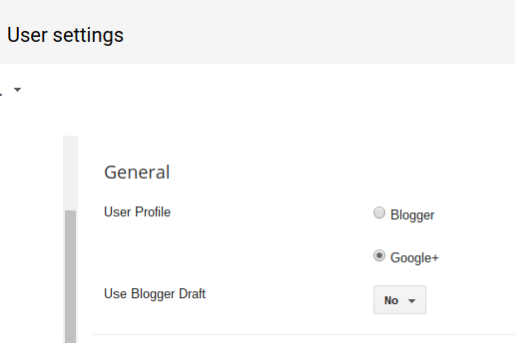
In the latter case, one must first clear the Draft Blogger setting, using the "User settings" dashboard page - where we see the key settingUse Blogger Draft
Change that option to "No" - then clear cache, cookies, and sessions, and restart the browser, to remove all residual components of Draft Blogger.
Use the Settings - "User settings" dashboard page.
Use the Blogger "User settings" dashboard page.
Change "Use Blogger Draft" to "No".
Then, hit "Save settings".
Finally, login to Blogger, properly.
Finally, log into Blogger, using a normal Blogger login. Avoid any bookmarks, favorites, or other saved access URLs. And, be sure to login properly.
Recently, we're seeing numerous reports from people in Blogger Help Forum: Something Is Broken, unable to successfully login to Blogger.I cannot log into Blogger - I keep getting this errorThe page isn't redirecting properly.
Firefox has detected that the server is redirecting the request for this address in a way that will never complete.
In a few cases, we are seeing a key clue to the cause of the problem.This problem can sometimes be caused by disabling or refusing to accept cookies.
And this now looks like another case of overly aggressive layered security procedures and settings.
Some time earlier, we had reports of people being forced to repetitively login - and other times, people who reported seeingConflicting edit
There was more than one attempt to edit this resource at the same time. This may have been because you double clicked on a link or a button or because someone else is also editing this blog or post.
The latter would be seen at random times, when trying to maintain or post to the blog. Sometimes the problem would go away by back spacing and trying again - but generally, the best recovery would be to clear cache, cookies, and sessions, restart the browser, and try again.
In extreme cases, it would be necessary to laboriously check all cookie filters - and maybe also, to stop clearing cookies regularly.
Now, it looks like Blogger has rewritten their blog ownership / cookie handling / login procedure, similar to how they rewrote their commenting / cookie handling / login procedure, some time ago.
The bottom line is that the previously seen login loop, where the blog owner (or guest trying to comment) formerly was made to manually click on various links from screen to screen, is now being forced through an automatic loop between the login displays - and the login loop is now being detected by the browser.Firefox has detected that the server is redirecting the request for this address in a way that will never complete.
Regardless of the exact symptoms - reported by people using Firefox, or any other browser - anybody desiring to publish comments (non anoymously) on any blog, or to publish posts or maintain one's own blog, needs to carefully check all cookie and script filters, and to consider the necessity of regularly clearing cookies.
(Update 2012/04/10): Latest reports of this problem indicate the involvement of Blogger accounts using Google+ profiles.
>> Top
One odd feature of the dynamic templates - giving your readers the choice how they want to view your blog - is a detail that not everybody seems to get.
In the ongoing discussion What do you think of Dynamic Views?, we see some dissenting opinions.I don't like the fact that readers can change the way they view my blog. I want things to be viewed the way I set them up, and not have them be changeable by the viewer.
Personally, as long as each view lets some people view my blog, I'm happy to let anybody select the template that lets them view the blog, as it pleases them.
As a blog publisher, my goal is to provide content, that's interesting and useful to my readers.
If all of the Dynamic Templates display the blog posts so my readers can read the posts, why should I care what format they select, to display the posts?
I chose to show my test blog - Musings, using the Magazine view, as the default. If some people choose to continue to read the content using Magazine, that's OK. If others decide that Timeslide is more their preference, that's fine too. The people using Timeslide to view the blog are still reading the blog - and maybe some people using Timeslide are people who might not choose to stay, if Magazine is the only choice.
You can't display this blog, using a dynamic template, any more. You may wish to evaluate dynamic views, for your blog, very carefully.
Personally, I'll let my readers decide. Their computers, their decision. But, it's your blog - and in the end, it's your choice.